



Fashion Models and Texts – Trends and Styles
RJ0300027_30
- Last Update 04/25/2025
- File Size 2.5MB
- # of Slides 2
- File Format PPTX
- Slide Ratio 16:9
- Color
Keywords
About the Product
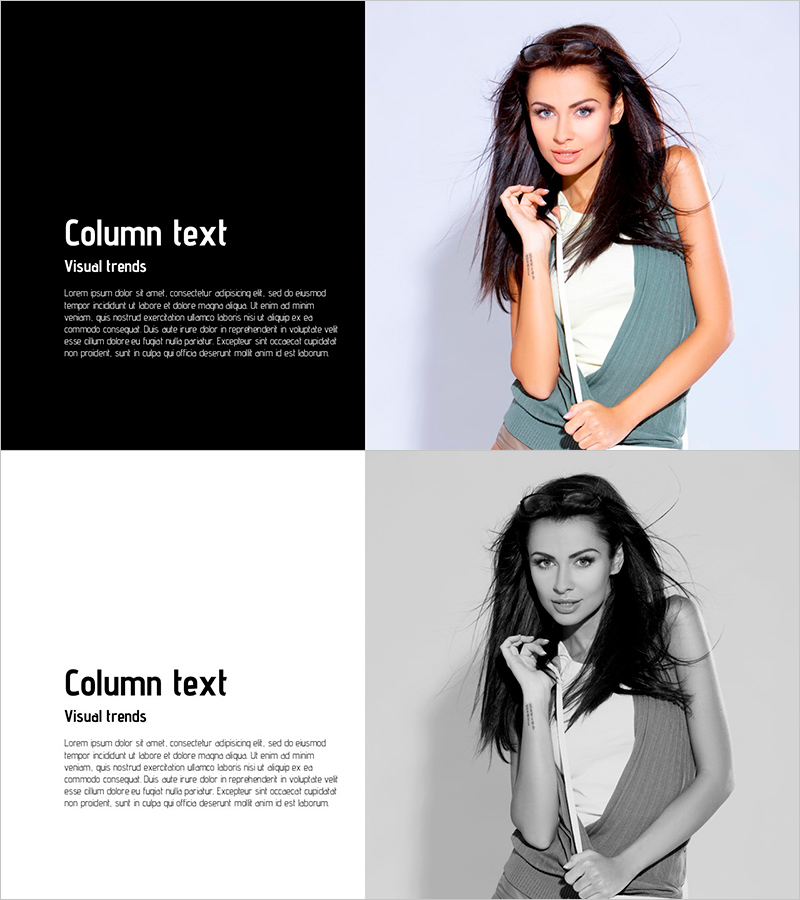
A PowerPoint slide optimized for introducing fashion, beauty, and lifestyle brand products and services. This presentation template features a two-column split layout with a black background text area on the left and an image space on the right, allowing you to input product names, descriptions, and key features while displaying product photography. Composed of 2 slides in 16:9 widescreen format, the design uses white typography and bright background contrast to enhance information readability. This PPT slide design is ideal for product line introductions in company presentations, product catalogs, and marketing presentations, as well as new product launch announcements.
Usage Points
-
Main Usage
This slide visually introduces brand products and services by balancing information and visuals. Enter product names, descriptions, and features in the left text area while placing product images on the right. Commonly used in fashion, beauty, and lifestyle industries for new product announcements, product line explanations, and marketing campaign presentations.
-
How to Use
Fill in the left-side text boxes with product name, description, and key features. Insert product photography in the right image area. The contrast between the black background and white text ensures excellent readability even in dimly lit conference rooms. Use both slides consecutively to showcase multiple products.
-
Recommended For
Fashion, beauty, and accessory brand managers, marketing teams, sales representatives, and product planners benefit from this template for new product launches, product catalog creation, and client presentations. It is also effective for product introduction sections in company profiles and quarterly new product launch announcements.
-
Slide Structure
Composed of 2 slides, each featuring a left-side black background text area with three input fields (product name, description, features) and a right-side image placement area. Designed in 16:9 widescreen format, optimized for modern projectors and monitor environments.
Related Products
-
Idea Presentation Template – A Wide Format with Visual Appeal
#Product/Service Introduction #Other #Benefits and Advantages
-
Circular Gradient Wide Template Diagram – Benefits and Features
#Product/Service Introduction #Diagram #Benefits and Advantages
-
Modern Chic Fashion Point – Style and Originality
#Product/Service Introduction #Benefits and Advantages #Product and Service Overview
-
Infinite Energy Wide Text Square Box – Introduction of Benefits and Advantages
#Product/Service Introduction #Text Box #Benefits and Advantages
