



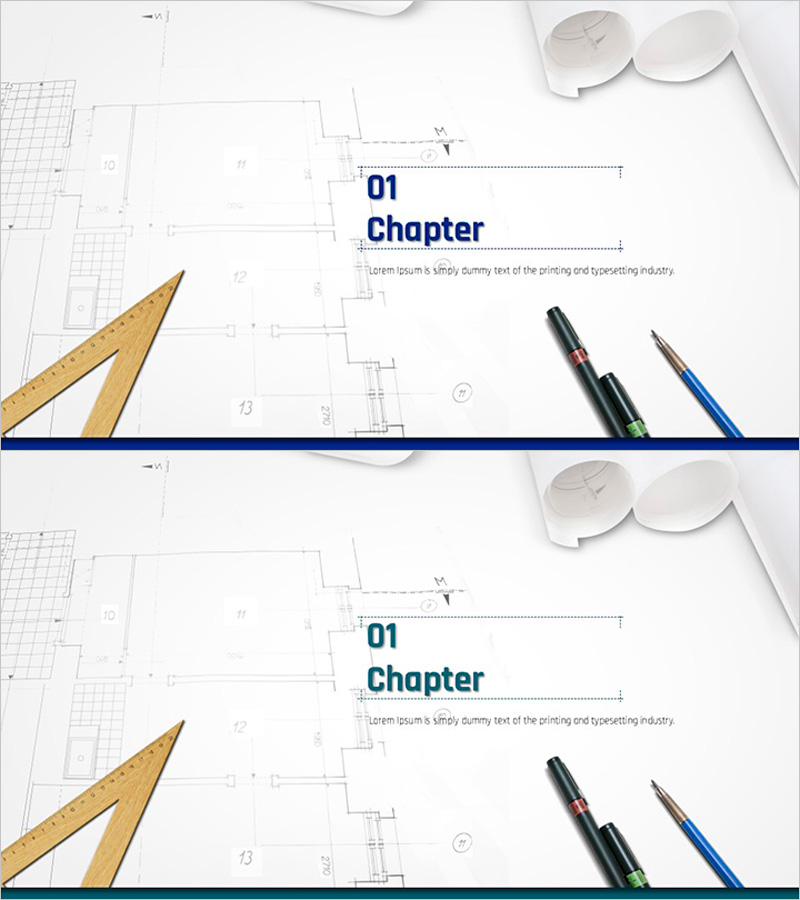
Architectural Design Template Chapter – Emphasizing Practicality in Design
RJ0300012_3
- Last Update 04/21/2025
- File Size 0.9MB
- # of Slides 2
- File Format PPTX
- Slide Ratio 16:9
- Color
Keywords
About the Product
A 2-slide chapter divider set for architectural design presentations. Features a minimalist layout with a dark blue horizontal bar, architectural tools (triangle ruler, pens), and blueprint background imagery. Each slide displays '01 Chapter' and '02 Chapter' with descriptive text areas. Delivered as a 16:9 widescreen PPTX file, ready for immediate editing. Perfect for architecture, design, and real estate presentations to create professional section breaks and visual transitions. Maintains design consistency while establishing clear content divisions throughout your PowerPoint presentation.
Usage Points
-
Main Usage
Serves as a professional section divider for architecture, design, and real estate presentations. The dark blue horizontal bar and architectural tool imagery reflect industry characteristics while maintaining a polished appearance. Creates clear visual transitions between major sections and refocuses audience attention at key presentation moments.
-
How to Use
Place before each major section to introduce chapter numbers and titles. Double-click text boxes to edit the '01 Chapter' numbering and section names, then customize the description area with section overviews. Maintains visual consistency with existing slides while clearly marking section boundaries.
-
Recommended For
Ideal for architecture firms, design studios, and real estate development companies presenting project proposals, design concepts, and progress reports. Suitable for architects, designers, sales professionals, and marketing teams who need to organize multi-section presentations with clear visual breaks.
-
Slide Structure
Two-slide set with '01 Chapter' and '02 Chapter' versions. Each slide contains a title area (number + Chapter text), central description text box, left-aligned architectural tool imagery, blueprint background, and dark blue horizontal accent bar at the bottom.
Related Products
-

City Line Theme Proposal Section Slide
#Slide Type #Section Cover
-
Multipurpose Business Plan Template Section Slide – Professional and Clean Design
#Slide Type #Section Cover
-
Business Plan PowerPoint Template – Stylish Composition
#Slide Type #Section Cover
-

Interior Business Plan Template Section: Emphasis on Market Analysis
#Slide Type #Section Cover
