



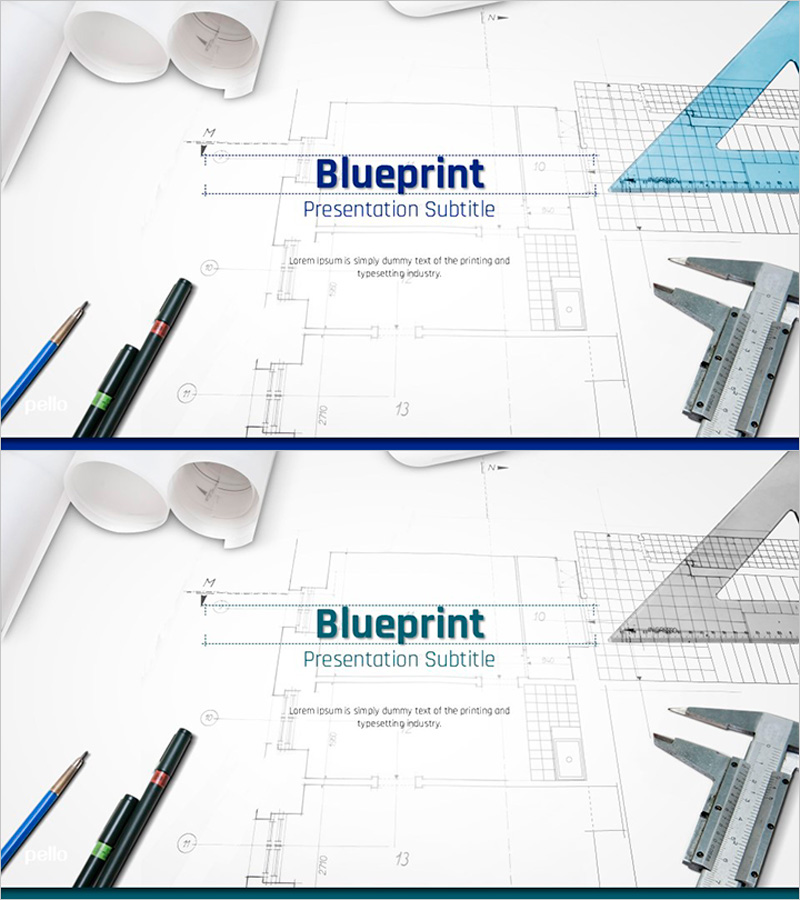
Architectural Design Template Main Cover
RJ0300012
- Last Update 04/21/2025
- File Size 1.2MB
- # of Slides 2
- File Format PPTX
- Slide Ratio 16:9
- Color
Keywords
About the Product
Professional cover slide PowerPoint template designed for architectural and engineering project presentations. Features a blueprint background with design tools imagery, creating a technical and credible visual foundation for architects, designers, and engineers. The layout includes a centered title input area at the top and subtitle space in the middle, with blue accent lines and grid pattern reinforcing the technical atmosphere. Delivered as a 2-slide set in 16:9 widescreen PPTX format, ready for immediate editing and customization. Ideal for architectural design proposals, construction projects, engineering presentations, and professional client meetings.
Usage Points
-
Main Usage
Establishes a strong first impression for architectural design, construction, and engineering presentations. The blueprint background and design tool imagery communicate technical expertise and professionalism, elevating project credibility when presenting to investors, clients, and stakeholders.
-
How to Use
Replace the 'Blueprint' text with your project title and update the 'Presentation Subtitle' section with presenter name, date, or company information. The blue accent lines and blueprint background remain fixed to maintain consistent branding, with dedicated logo placement space in the upper right corner.
-
Recommended For
Architects, design professionals, construction engineers, real estate developers, and construction company executives presenting project proposals, design reviews, client pitches, and investor presentations. Also suitable for architecture students presenting graduation projects and academic research.
-
Slide Structure
2-slide set with Slide 1 featuring a centered title input area (top), subtitle section (center), and logo space (upper right). Slide 2 mirrors the blueprint background layout for use as a backup or section divider. Both slides are optimized in 16:9 widescreen format for modern presentation environments and professional display.
Related Products
-
Standard Investment Attraction PPT Template Cover – Showcasing Investment Appeal
#Slide Type #Cover
-
Personalized Exercise Consulting Proposal Cover – A Harmonious Blend of Professionalism and Innovation
#Slide Type #Cover
-
Startup Business Investment Attraction PPT Cover
#Slide Type #Cover
-

Prospective Business Plan Template Cover – Vision for Success
#Slide Type #Cover
