



Modern Blue Presentation Man Power – Emphasizing Team Introduction
RJ0200035_4
- Last Update 04/08/2025
- File Size 2.3MB
- # of Slides 2
- File Format PPTX
- Slide Ratio 16:9
- Color
Keywords
About the Product
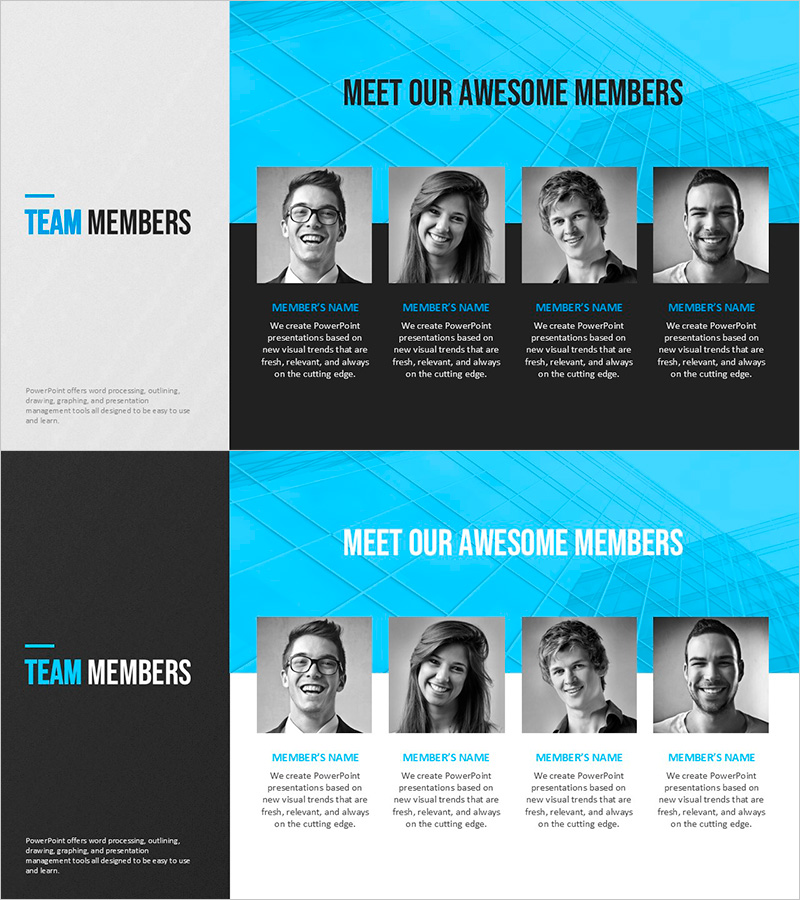
A 2-slide set for introducing team members in company presentations. Features a bright blue geometric background with 4 profile photo slots arranged in a grid layout, each with editable name and role description fields. The first slide uses a black bottom bar design, while the second offers a white bottom bar variation for flexible styling. Instantly customizable in PowerPoint—simply insert photos and edit text. Perfect for investor pitches, partnership presentations, recruitment events, and corporate introductions where team credibility matters.
Usage Points
-
Main Usage
Introduce key team members in company presentations with credibility and professionalism. The blue geometric pattern background reinforces corporate trust and expertise, while profile photos combined with role descriptions effectively showcase your organization's human capital and leadership strength.
-
How to Use
Insert team member photos into the designated slots and fill in name, job title, and role description text fields. Choose between two layout options (black or white bottom bar) to match your presentation's overall tone. Use in investor pitches, partnership meetings, recruitment presentations, and corporate overview videos.
-
Recommended For
Ideal for startup funding pitches, corporate partnership negotiations, recruitment fairs, company introduction presentations, and any business scenario requiring executive or team introductions. Especially effective when emphasizing team credibility and professional expertise to stakeholders.
-
Slide Structure
2-slide layout with consistent structure: title area (MEET OUR AWESOME MEMBERS) at top, 4 profile photo slots in center grid, and member information input area (name + role description) at bottom. First slide features black bottom bar; second offers white bottom bar variation for flexible document styling.
Related Products
-
Player Introduction Slide – Emphasizing Team Culture and Performance
#Company Introduction #Manpower
-
Introducing Smart Health Team
#Company Introduction #Diagram #Manpower
-
Magic Infographic Slide – Innovation With Visual Appeal
#Company Introduction #Product/Service Introduction #Diagram
-
Manpower against One Infographic Background – The Power of Teamwork and Collaboration
#Company Introduction #Diagram #Manpower
