



Online Presentation Template Diagram5 – Creative Marketing Strategy
RJ0200025_16
- Last Update 04/04/2025
- File Size 3.2MB
- # of Slides 2
- File Format PPTX
- Slide Ratio 16:9
- Color
Keywords
- #Content-Based Slides
- #Design-Based Slides
- #Product/Service Introduction
- #Marketing Plan and Strategy
- #Diagram
- #Features
- #Marketing Strategy
- #Spread
- #Decentralized Diagram
- #16:9
- #bilateral cluster diagram PowerPoint
- #marketing strategy slide template
- #6-node diagram
- #symmetric diagram PowerPoint
- #how to create cluster diagram in PowerPoint
About the Product
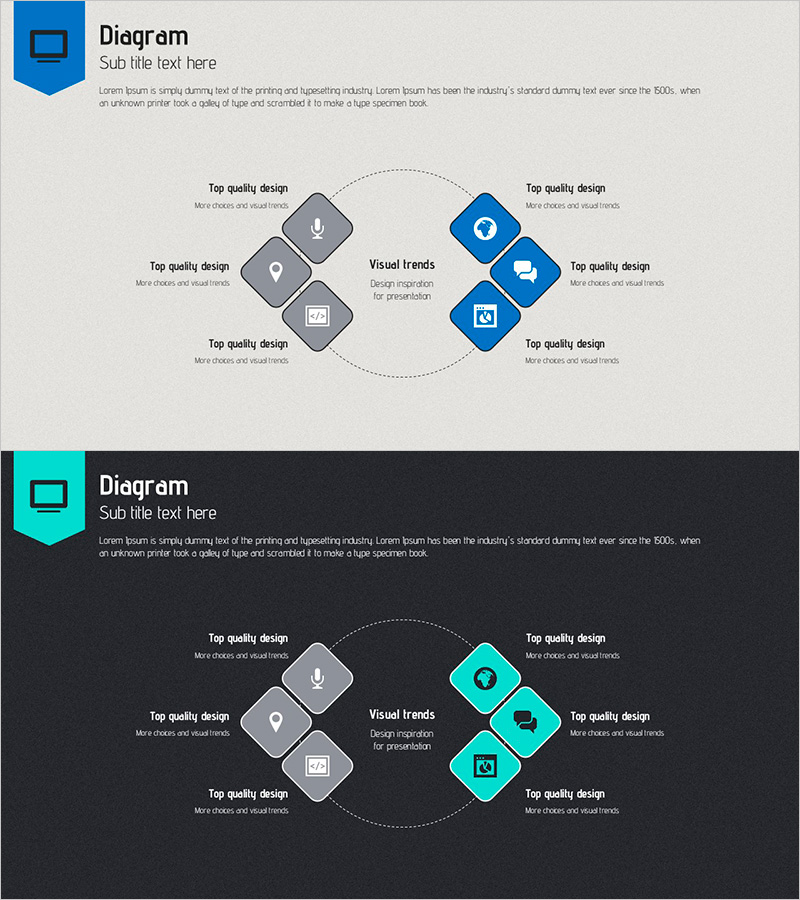
A bilateral cluster diagram PowerPoint slide optimized for marketing strategy development and creative idea generation. The diagram features a central 'Visual trends' concept with three nodes on the left (gray) and three nodes on the right (blue) arranged symmetrically. Each node includes an icon and text input area for customization. This 2-slide set in 16:9 widescreen format is ready to use for marketing planning, strategy presentations, and online business proposals. All shapes and text are fully editable, allowing easy color changes and content customization to match your brand guidelines.
Usage Points
-
Main Usage
Ideal for presenting marketing strategies, brainstorming creative concepts, and explaining business relationships. The central concept (Visual trends) anchors six related elements arranged symmetrically on both sides, clearly communicating multi-layered strategy structure and interdependencies.
-
How to Use
Enter marketing elements (target audience, channels, content types, design inspiration, etc.) into each node's text area. Use the left gray nodes for existing strategies and right blue nodes for new initiatives, or apply them as comparative analysis items. Icons can be replaced to match each element's category.
-
Recommended For
Marketing managers, strategy planning teams, creative advertising departments, and online business professionals. Perfect for strategy meetings, brainstorming sessions, and client presentations. Especially effective for marketing plans requiring bilateral comparison and analysis.
-
Slide Structure
2-slide set with identical layouts. Each slide features a central circular area for core concept text, three left nodes (gray squares with icons), and three right nodes (blue squares with icons). Dotted circular connector lines show relationships between nodes. Optimized for 16:9 widescreen display.
Related Products
-

Communication Strategy Diagram – Cluster for Marketing Strategy
#Product/Service Introduction #Marketing Plan and Strategy #Diagram
-
Ship Handle Diagram – Elegant Design with Visual Appeal
#Product/Service Introduction #Diagram #Product/Service Introduction
-
Circular Connection Diagram for Marketing Strategy
#Business Introduction #Marketing Plan and Strategy #Diagram
-
Analysis of Human Response to the Vaccine – Insights into Health
#Product/Service Introduction #Diagram #Features
