



Leather Material Presentation Template Diagram – Product and Service Introduction
RJ0200021_9
- Last Update 04/03/2025
- File Size 6.8MB
- # of Slides 2
- File Format PPTX
- Slide Ratio 16:9
- Color
Keywords
- #Content-Based Slides
- #Product/Service Introduction
- #Business Introduction
- #Product/Service Introduction
- #Business Areas
- #16:9
- #business area diagram PowerPoint
- #3-circle diagram slide
- #product introduction PowerPoint slide
- #how to make a business area diagram in PowerPoint
- #professional presentation slide template
About the Product
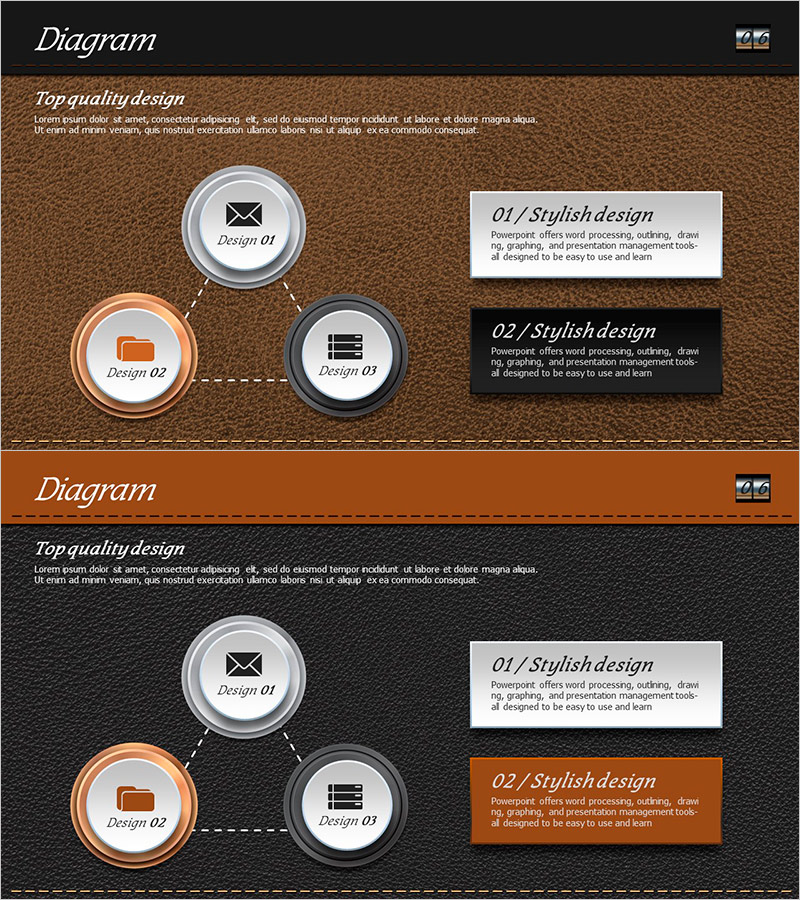
A 3-circle diagram PowerPoint slide designed for presenting business areas, products, and services. The leather texture background with brown, orange, and charcoal circular icons creates a professional business aesthetic. Each section includes ample space for descriptions, making it ideal for company profiles, proposals, and business plans. The 2-slide set offers both brown and dark gray background options to match your document's tone and style. Icons and text boxes are fully editable for quick customization.
Usage Points
-
Main Usage
Visually present your company's core business areas or product portfolio across three categories using interconnected circular icons. Each circle displays an icon and label, while adjacent text boxes provide detailed descriptions, helping audiences quickly grasp your business scope.
-
How to Use
Insert this slide into the business overview section of company presentations, proposal documents, or business plan decks. Edit the circle labels and description boxes with your company's specific business areas or product names. Choose between the brown or dark gray background version to match your presentation theme.
-
Recommended For
Corporate business development teams preparing company profiles, proposal writers presenting service portfolios, startup founders creating investor pitch decks, marketing professionals showcasing product lines, and consultants delivering client presentations.
-
Slide Structure
Slide 1 (brown background): 3 circular icons with colored borders (gray, orange, charcoal) + 2 text description boxes on the right / Slide 2 (dark gray background): identical layout. Total 6 editable text areas (3 circle labels + 3 description sections) with icon placeholders.
Related Products
-
Sea Life Closed Diagrams – Product/Service Introduction
#Product/Service Introduction #Business Introduction #Diagram
-
The Road Presentation Icon&Text – Unlocking Visual Potential
#Product/Service Introduction #Business Introduction #Product/Service Introduction
-
Engagement Strategy Through Child Communication – Effective Approach
#Product/Service Introduction #Business Introduction #Diagram
-
Medical Field Illustration Closure Diagram – Enhancing Visual Understanding
#Product/Service Introduction #Business Introduction #Diagram
