



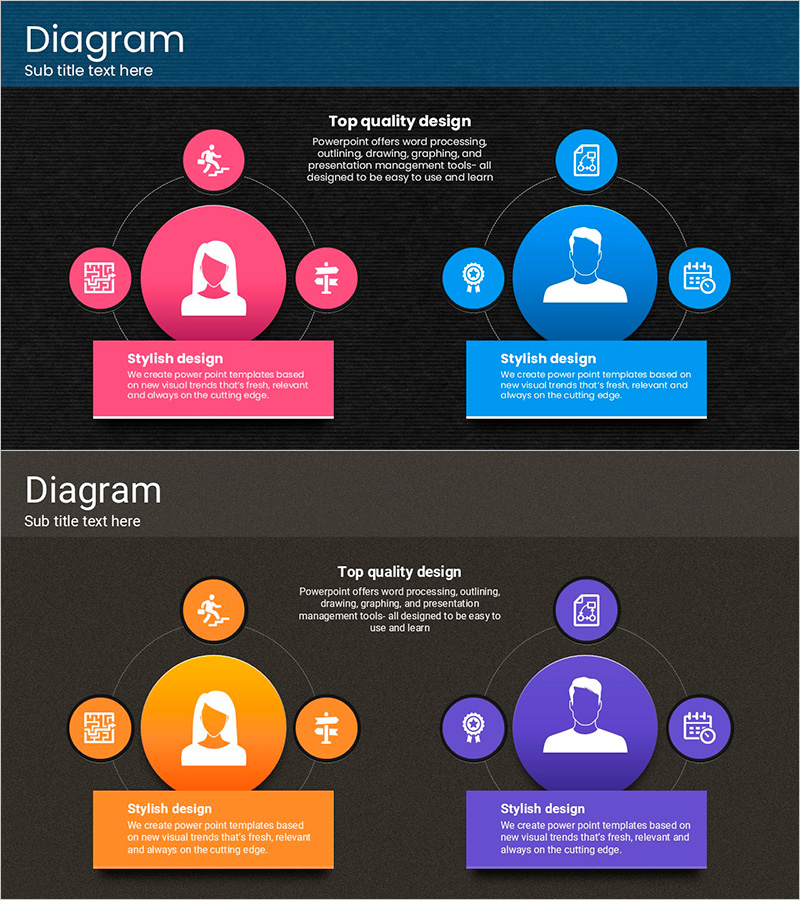
Visualizing Customer Analysis with Touch Wide Diagram
RJ0200008_23
- Last Update 03/30/2025
- File Size 3.4MB
- # of Slides 2
- File Format PPTX
- Slide Ratio 16:9
- Color
Keywords
- #Content-Based Slides
- #Design-Based Slides
- #Market and Competitor Analysis
- #Marketing Plan and Strategy
- #Diagram
- #Customer Analysis
- #Target Setting
- #Spread
- #Centralized Diagram
- #16:9
- #radial diagram PowerPoint
- #center node slide template
- #customer analysis visualization
- #organizational structure diagram
- #marketing segmentation PPT
- #how to create radial diagram in PowerPoint
- #radial chart slide design
About the Product
A radial diagram PowerPoint slide with a central focal point expanding outward to surrounding elements. Two contrasting color schemes—pink and blue—feature central nodes with person icons connected to five peripheral circular nodes, ideal for visualizing customer analysis, organizational structure, team roles, and marketing segments. Each node includes a text box for detailed descriptions, and the 16:9 widescreen format with 2 slides enables immediate integration into presentations. The radial layout creates intuitive relationships between core subjects and supporting information.
Usage Points
-
Main Usage
Positions a core subject (customer, leader, team) at the center and radiates supporting elements (attributes, roles, touchpoints, segments) outward to reveal relationships and hierarchies at a glance. Ideal for customer analysis, organizational charts, team composition, marketing segmentation, business ecosystem mapping, and any presentation requiring center-to-periphery relationship visualization.
-
How to Use
Enter the primary concept or person in the large central node, then populate the five surrounding nodes with related items (characteristics, responsibilities, contact points, data, strategies). Add detailed explanations in the text boxes below each node to enhance audience comprehension during presentation. Use contrasting colors to distinguish groups or indicate priority levels.
-
Recommended For
Marketing professionals (customer segmentation, target analysis), organizational development specialists (team structure, role definition), business strategists (ecosystem mapping, partnership frameworks), management consultants (organizational diagnostics, process analysis), and educators (concept explanation, relationship mapping).
-
Slide Structure
Two-slide set with identical radial layout. Each slide features a large central circular node (pink or blue with person icon) surrounded by five smaller circular nodes arranged radially. Connecting lines link center to periphery nodes. Each node contains a white icon and text input area, creating a hierarchical visual structure with clear center-to-periphery relationships.
Related Products
-
Customized Analysis Strategy by Audience Type – Secrets of Market-Driven Marketing
#Market and Competitor Analysis #Marketing Plan and Strategy #Diagram
-

Analysis of Key Target Students Slide
#Market and Competitor Analysis #Marketing Plan and Strategy #Diagram
-
Instrumentalist and Diffusion Diagram – Effective Market Analysis
#Product/Service Introduction #Market and Competitor Analysis #Diagram
-

Idea Derivation Template – Silhouette Design
#Market and Competitor Analysis #Marketing Plan and Strategy #Other
