



Schedule Management Slide – Practical Design
RB0800003_16
- Last Update 03/17/2025
- File Size 0.1MB
- # of Slides 2
- File Format PPTX
- Slide Ratio 4:3
- Color
Keywords
About the Product
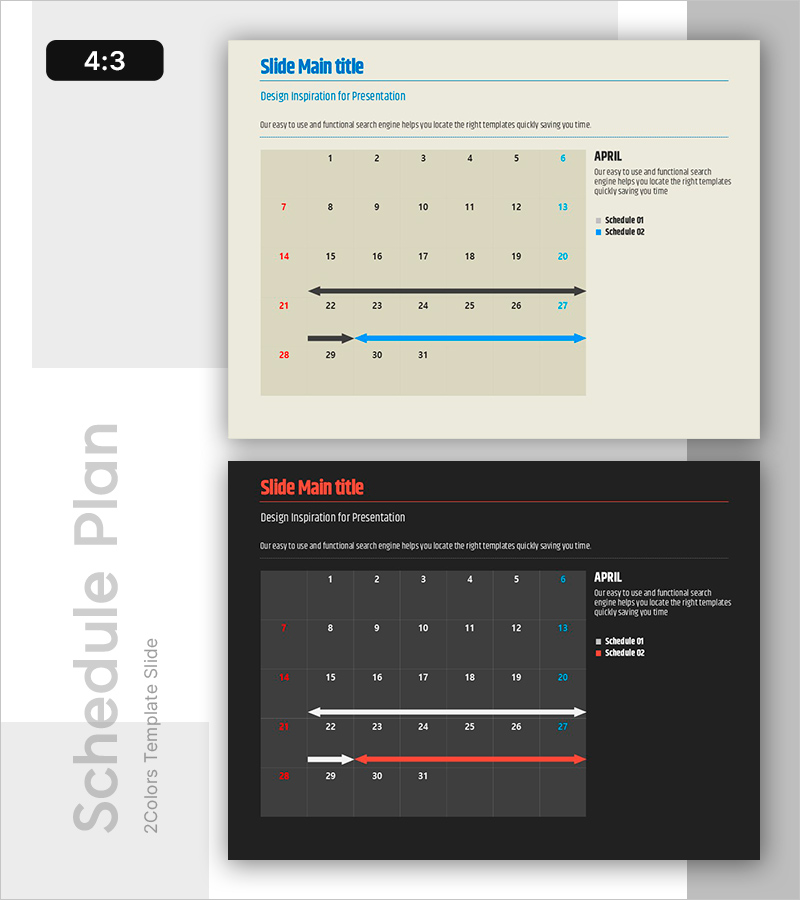
A 2-slide PowerPoint set designed to visualize project timelines and milestones with clarity and impact. Featuring a beige background with red and blue accent colors, this timeline-based layout effectively communicates monthly schedules and phased implementation plans. The calendar-style date display combined with arrow-based progress indicators makes it ideal for team meetings, business planning presentations, and project kickoffs. Ample text input areas allow for easy schedule updates, and the 4:3 aspect ratio ensures compatibility across all presentation environments.
Usage Points
-
Main Usage
Visualize project schedules, milestones, and phased implementation plans using timeline format, enabling teams to grasp timelines at a glance. Calendar display and arrow-based progress representation accelerate decision-making and stakeholder alignment.
-
How to Use
Slide 1 serves as a monthly schedule tracker—input dates and use color highlights to mark critical milestones. Slide 2 functions as a project phase timeline—adjust arrow length and color to reflect progress status. Deploy in team meetings, executive briefings, and client presentations.
-
Recommended For
Project managers, business planning teams, marketing specialists, and operations managers use this for schedule sharing and progress reporting. Ideal for business plans, project proposals, and quarterly performance reports' execution plan sections.
-
Slide Structure
Slide 1: Monthly calendar grid (dates 1–31) + right-side legend (Schedule 01/02) + text description area. Slide 2: Three timeline arrows (black, blue, red) + date range indicators + text input zones. Total of 2 primary input areas for customization.
Related Products
-
Competitive Analysis PowerPoint Slide – Four-Way Star Table
#Market and Competitor Analysis #Diagram #Competitor Analysis
-
Contact Closing PowerPoint Slide – Interior Dark Two-Column
#Company Introduction #Contact Information
-

Brand vs. Competitor Messaging Slide – 3-Point, Blue & Green
#Product/Service Introduction #Market and Competitor Analysis #Benefits and Advantages
-
Procurement Table PowerPoint Slide – Item Photo Budget Dark
#Product/Service Introduction #Financial Plans and Performance #Features
