



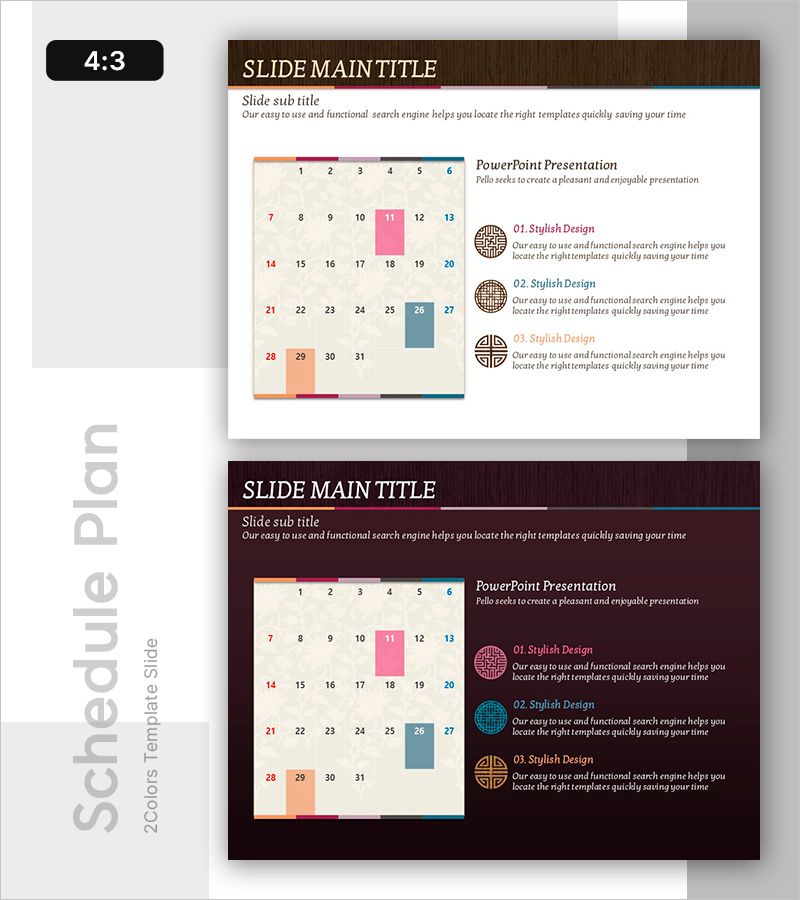
Stylish Presentation Slide for Schedule Management
RB0700017_6
- Last Update 03/16/2025
- File Size 4.9MB
- # of Slides 2
- File Format PPTX
- Slide Ratio 4:3
- Color
Keywords
- #Content-Based Slides
- #Design-Based Slides
- #Business Management
- #Diagram
- #Implementation Plan
- #Implementation Schedule
- #Table
- #Standard Table
- #4:3
- #calendar table PowerPoint slide
- #monthly schedule presentation template
- #31-day calendar PPT
- #schedule management slide design
- #date grid PowerPoint template
About the Product
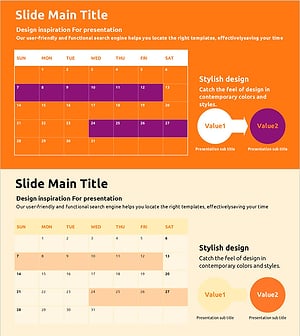
A calendar-formatted table PowerPoint slide designed for monthly schedule management and planning. The slide features a 31-day grid structure with color-coded date cells (orange, pink, blue, gray) to distinguish weekdays and weekends at a glance. Two slide layouts are provided: a light cream background version and a dark brown background version, allowing you to match your presentation's overall tone. Each date cell is editable for adding specific tasks, deadlines, or events. Perfect for project timelines, team schedules, event planning, and business presentations requiring visual schedule representation.
Usage Points
-
Main Usage
Display monthly project timelines, team schedules, and event planning in a visual calendar format. The grid-based layout enables all stakeholders to view the complete monthly schedule at once, making it ideal for status updates and planning discussions.
-
How to Use
Click on individual date cells to add text, modify colors, or insert icons. Highlight important deadlines with accent colors, use symbols for key events, and customize the layout to match your presentation content. Both background versions support full editing in PowerPoint.
-
Recommended For
Project managers, marketing teams, event planners, HR professionals, and operations managers. Suitable for quarterly planning presentations, team meetings, executive briefings, and resource allocation discussions.
-
Slide Structure
Two-slide set: light version (cream background with wood-tone header) and dark version (dark brown background with wood-tone header). Each slide contains a 31-cell date grid with color-coded cells, weekend highlighting, and a right-side text area for additional information or notes.
Related Products
-
Premium Cafe Business Plan Timeline – Roadmap to Success
#Business Management #Diagram #Implementation Plan
-
Clear Slide for Christmas Eve Schedule
#Business Management #Diagram #Implementation Plan
-
Tennis Schedule – Efficient Management and Planning
#Business Management #Diagram #Implementation Plan
-
Schedule Template with Color Theme – Business Management and Action Plans
#Business Management #Diagram #Implementation Plan
