



Child Education Checklist – Effective Action Plan
RB0700006_10
- Last Update 03/15/2025
- File Size 1.1MB
- # of Slides 2
- File Format PPTX
- Slide Ratio 4:3
- Color
Keywords
- #Content-Based Slides
- #Design-Based Slides
- #Business Management
- #Text Box
- #Execution Plan
- #Implementation Plan
- #Rounded Rectangle Text Box
- #4:3
- #education checklist PowerPoint slide
- #child education presentation template
- #learning management checklist
- #how to create an education checklist in PowerPoint
- #educational planning slide design
About the Product
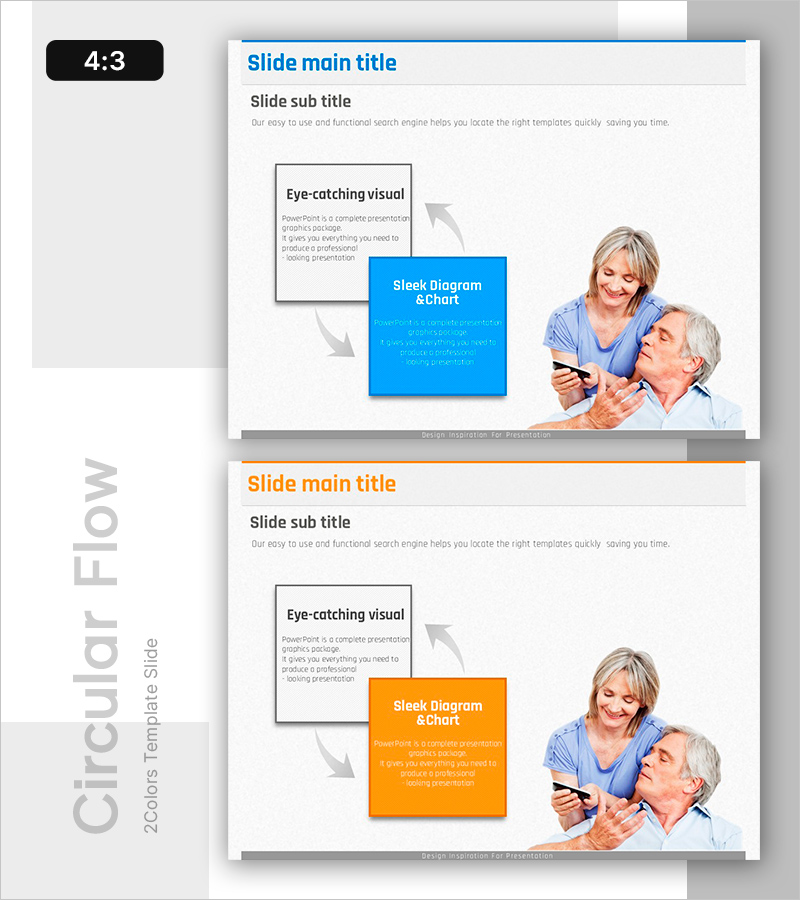
A PowerPoint slide designed for child education and learning management with a checklist format. This 2-slide presentation features a left text box paired with right accent boxes in blue and orange, enabling clear visualization of effective action plans and progress tracking. The layout incorporates real-life photography and arrow flow diagrams to convey educational processes intuitively. Available in 4:3 aspect ratio PPTX format for immediate editing and use. Ideal for educational institutions, parent consultations, and learning plan presentations.
Usage Points
-
Main Usage
This checklist slide is designed for educational institutions to establish learning plans and track progress. It effectively communicates action plans and checklist items in parent consultations, individual student learning plan presentations, and educational outcome reports.
-
How to Use
Enter educational goals, learning content, and checklist items in the left text box, while placing key messages, achievements, and next steps in the right accent box. Use arrow flow diagrams and real photography to emphasize process continuity, and differentiate priority levels with blue and orange color coding.
-
Recommended For
Ideal for education administrators, parent consultation coordinators, educational program planners, and learning coaches presenting individual student learning plans, educational outcome reports, and parent briefing sessions.
-
Slide Structure
Composed of 2 slides, each featuring a left text input area (title, subtitle, descriptive text), center arrow flow diagram, and right accent box (blue or orange). Real-life photography combined with clear information hierarchy creates a comparative layout for effective communication.
Related Products
-
Slide Template Visualizing Detailed Plans - Collaboration and Process
#Business Management #Diagram #Text Box
-
Service Promotion and Development Plan – Visual Representation of Vision and Strategy
#Business Management #Diagram #Execution Plan
-
Providing Direction for Global Development – Effective Implementation through Business Management and Clustering
#Business Management #Diagram #Other
-
Step-by-Step Plan for Music Class Progression – Visually Enhanced Cluster Diagram
#Business Management #Diagram #Execution Plan
