



Healthcare PPT Strategy Diagram – Business Vision and Solutions
RB0400003_4
- Last Update 03/11/2025
- File Size 0.3MB
- # of Slides 2
- File Format PPTX
- Slide Ratio 4:3
- Color
Keywords
- #Content-Based Slides
- #Design-Based Slides
- #Business Vision and Strategy
- #Operational Plan
- #Diagram
- #Business Strategy
- #Mitigation Measures
- #Spread
- #Centralized Diagram
- #4:3
- #radial diagram PowerPoint
- #hub-and-spoke slide template
- #5-node strategy diagram
- #business structure diagram PPT
- #central concept expansion diagram
About the Product
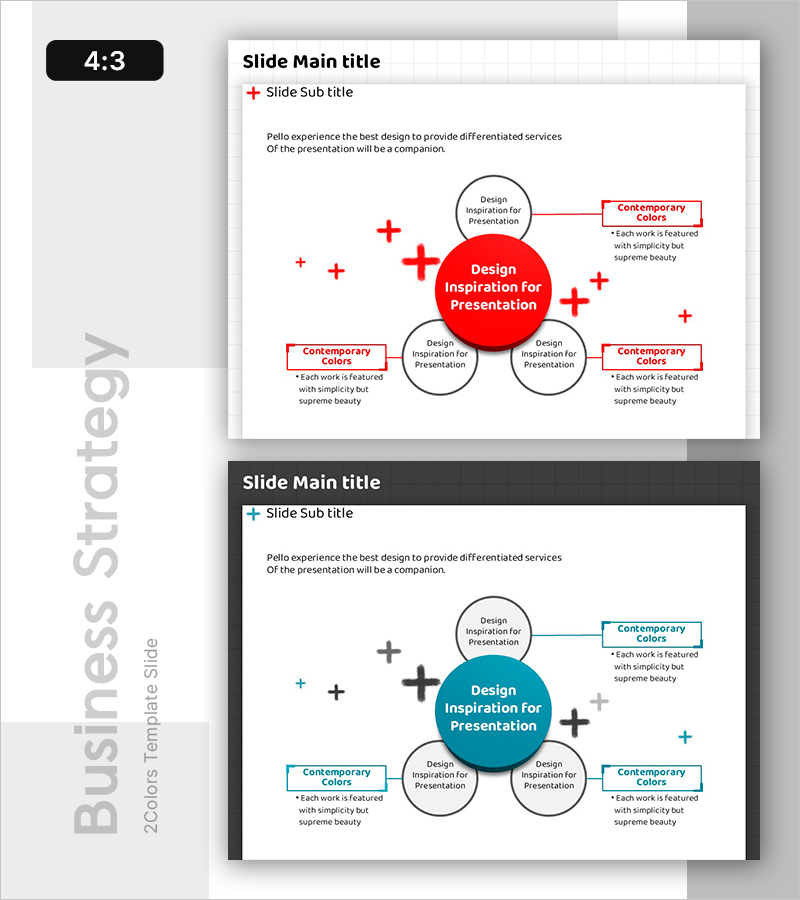
A PowerPoint slide featuring a central hub-and-spoke diagram with one core concept in the center and four related elements radiating outward. The design uses contrasting red and blue colors to emphasize hierarchy and importance, with circular nodes connected by lines and plus symbols. This layout effectively visualizes business vision, strategic direction, and operational frameworks by showing how central ideas connect to supporting initiatives. The slide is ideal for strategy presentations, business plans, and organizational structure explanations where you need to demonstrate the relationship between a core concept and its supporting elements.
Usage Points
-
Main Usage
Displays a central strategic concept or organizational vision with four supporting elements arranged radially around it. Effectively communicates hierarchical relationships and interconnections in strategy development, business planning, and organizational structure presentations.
-
How to Use
Enter your core concept (e.g., business vision, strategic goal) in the central red circle. Add four supporting elements (e.g., operational strategy, technology strategy, marketing strategy, financial strategy) in the surrounding gray circles. Use the text boxes on the right to provide detailed explanations for each element.
-
Recommended For
Executive reports, business plans, strategic planning presentations, organizational structure explanations, and investor pitch decks. Particularly effective for healthcare, consulting, finance, and manufacturing industries where complex business structures need clear visualization.
-
Slide Structure
One red circular node in the center connected to four gray circular nodes positioned at top, bottom, left, and right. Red lines with plus symbols indicate connections between the central node and surrounding nodes. Two text boxes labeled 'Contemporary Colors' are positioned on the right side for additional annotations.
Related Products
-
Cooking Options Diagram – Business Strategy and Operations Plan
#Business Vision and Strategy #Operational Plan #Diagram
-
Keyword Strategy Diagram – Spreading Towards Business Goals
#Business Vision and Strategy #Operational Plan #Diagram
-
Compass Diffusion Diagram – Product/Service Introduction and Business Vision
#Product/Service Introduction #Business Vision and Strategy #Diagram
-
Characteristics of Cats Visualization Diagram Slide – Charm and Style
#Business Vision and Strategy #Operational Plan #Diagram
