



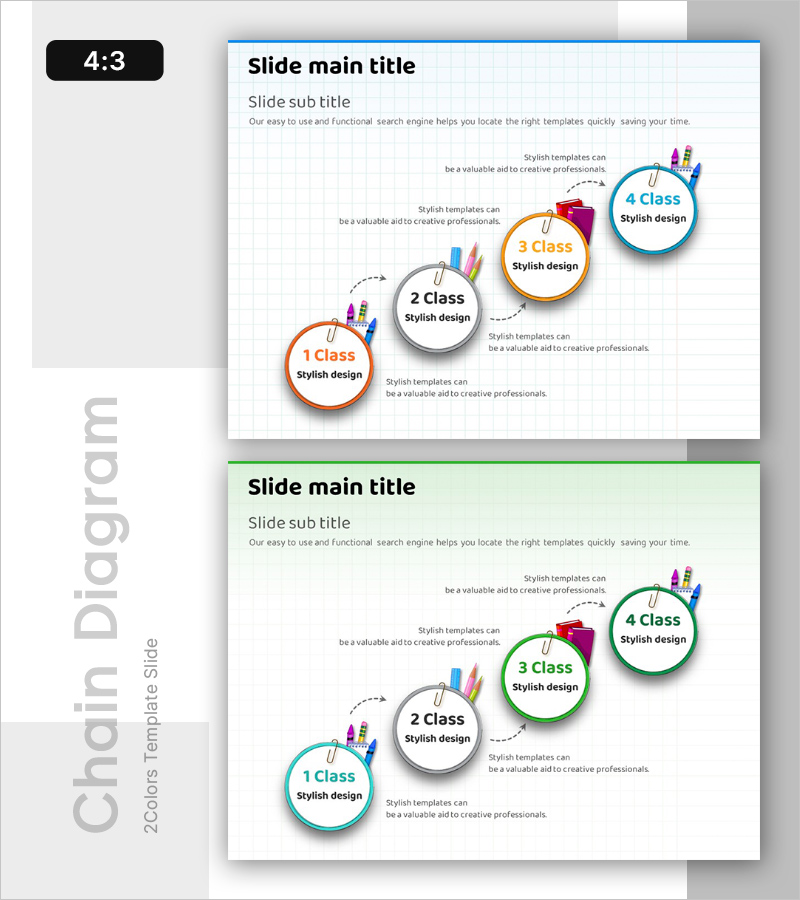
Step-by-Step Learning Progress – Step 4 of the Structured Learning Path
RB0300029_6
- Last Update 03/10/2025
- File Size 0.5MB
- # of Slides 2
- File Format PPTX
- Slide Ratio 4:3
- Color
Keywords
- #Content-Based Slides
- #Design-Based Slides
- #Business Strategy
- #Business Management
- #Diagram
- #Step-by-Step Schedule Plan
- #Execution Plan
- #Cluster
- #Chain Diagram
- #4:3
- #4-step diagram PowerPoint
- #circular diagram slide template
- #learning progress PowerPoint
- #process flow diagram slide
- #business strategy presentation template
About the Product
A 4-step circular diagram PowerPoint slide that visualizes sequential learning progression and process flows. Orange, gray, yellow, and blue circular nodes are connected by arrows to represent linear advancement through each stage. Each node includes icon areas and text fields for documenting learning objectives, content, and outcomes. This PowerPoint template is ready to use for business strategy presentations, project phase management, educational curriculum design, and organizational change initiatives.
Usage Points
-
Main Usage
Clearly communicate sequential processes such as learning progression, business strategy phases, project milestones, and organizational transformation through a structured 4-step framework. Separate each stage's objectives, content, and outcomes to transform complex learning paths or business plans into simple, easy-to-understand visuals.
-
How to Use
Enter stage names, learning objectives, timelines, and responsible parties into each circular node. Insert relevant icons or symbols in the icon area and add detailed descriptions in the text fields. Color-coding by stage ensures visual distinction; customize node colors, sizes, and text styles as needed. All elements are fully editable in standard PowerPoint.
-
Recommended For
Ideal for educational curriculum presentations, corporate business plans, project management reports, organizational development strategies, employee onboarding materials, and marketing campaign phase timelines. Particularly effective for presentations where sequential progression is critical and audience comprehension is essential.
-
Slide Structure
Two-slide set with blue header bar on the first slide featuring four circular nodes (1 Class, 2 Class, 3 Class, 4 Class) arranged left to right, connected by dotted arrows. Second slide uses identical layout with green header bar. Each node contains text input areas and icon spaces. 4:3 aspect ratio ensures compatibility with standard presentation formats.
Related Products
-
Hourly Work Schedule Planning Slide – Efficient Business Strategy
#Business Strategy #Business Management #Diagram
-
Marketing Plan Flow Analysis Chart – Step-by-Step Execution Plan
#Business Strategy #Business Management #Diagram
-
Planning Line Chart – Business Strategy and Management
#Business Strategy #Business Management #Diagram
-
Practical Steps to Improve Your Fitness – Actionable Execution Strategy
#Business Strategy #Business Management #Diagram
