



Business Goal Flow Diagram - Visualizing Business Strategy
RB0300027_4
- Last Update 03/10/2025
- File Size 2.2MB
- # of Slides 2
- File Format PPTX
- Slide Ratio 4:3
- Color
Keywords
- #Content-Based Slides
- #Design-Based Slides
- #Product/Service Introduction
- #Business Vision and Strategy
- #Diagram
- #Program Introduction
- #Business Goals
- #Cluster
- #Chain Diagram
- #4:3
- #connection diagram PowerPoint
- #business goal flowchart
- #business strategy presentation
- #process flow slide
- #3-step diagram template
About the Product
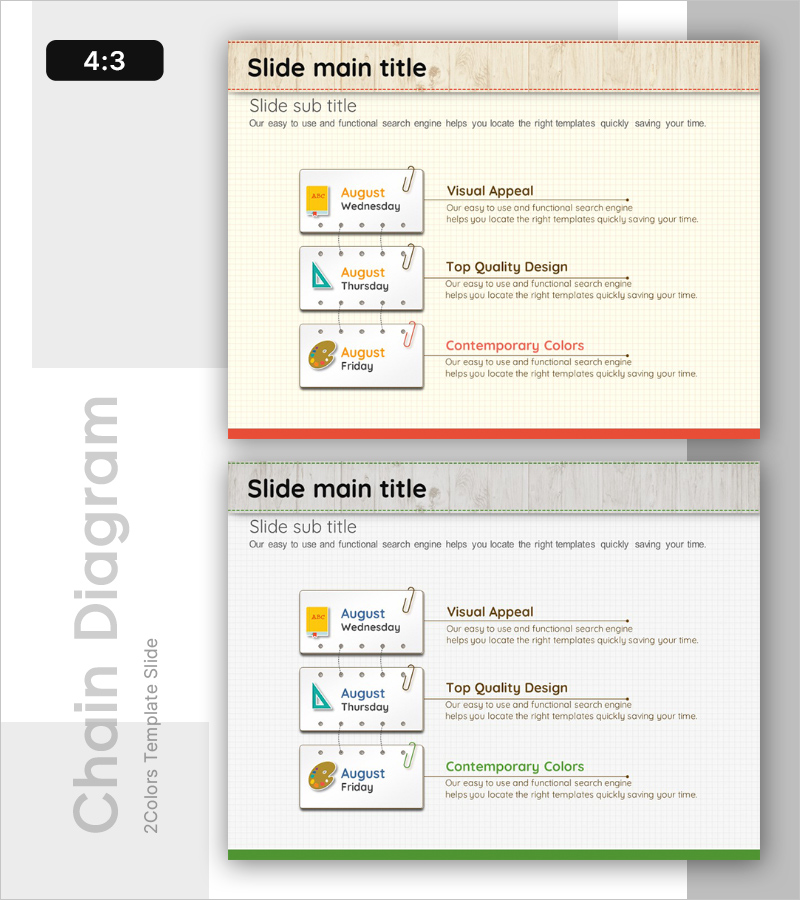
A connection diagram PowerPoint slide that visualizes business objectives and strategies in sequential stages. Three nodes are linked with arrows to clearly represent process flow. The beige background features orange, teal, and brown icons to distinguish each stage, with a text area on the right for detailed explanations. This slide template is ready to use for business strategy presentations, goal achievement processes, project phases, and various corporate presentations.
Usage Points
-
Main Usage
Designed to express business goal achievement in three sequential stages and explain key content for each phase through text. Ideal for communicating business strategies, project phases, goal achievement roadmaps, and strategic initiatives visually.
-
How to Use
Enter stage names in the three left-side nodes and write detailed descriptions in the right text area. You can maintain the existing icon and color design or customize them to match your company brand. Duplicate the slide to represent multiple processes or workflows.
-
Recommended For
Perfect for executives, planning teams, project managers, and marketing teams explaining business strategies, new business plans, organizational restructuring, and marketing campaign phases. Suitable for investor presentations, management reports, and strategic planning meetings.
-
Slide Structure
Two-slide set in 4:3 aspect ratio. Each slide features a three-node diagram with arrow connections on the left and a text explanation area on the right. Nodes are color-coded in orange, teal, and brown with icons for visual distinction.
Related Products
-
Business Objectives Diagram – Comprehensive Guide to Business Strategies
#Product/Service Introduction #Business Vision and Strategy #Diagram
-

Business Goals of a Conscientious Businessman – Business Strategy Slide
#Product/Service Introduction #Business Vision and Strategy #Diagram
-

Modern Design Emphasizing Top Quality in Presentation Template
#Product/Service Introduction #Business Vision and Strategy #Diagram
-
Modern Design Color Emphasis Slide – Inspiration for Presentations
#Product/Service Introduction #Business Vision and Strategy #Program Introduction
