



Ripple Effect of Green Energy - Center for Sustainable Development
RB0100040_7
- Last Update 03/05/2025
- File Size 0.4MB
- # of Slides 2
- File Format PPTX
- Slide Ratio 4:3
- Color
Keywords
- #Content-Based Slides
- #Design-Based Slides
- #Business Introduction
- #Operational Plan
- #Diagram
- #Business Areas
- #Mitigation Measures
- #Spread
- #Decentralized Diagram
- #4:3
- #radial diagram PowerPoint
- #4-direction PowerPoint slide
- #central concept diagram
- #business presentation slide
- #how to create radial diagram in PowerPoint
About the Product
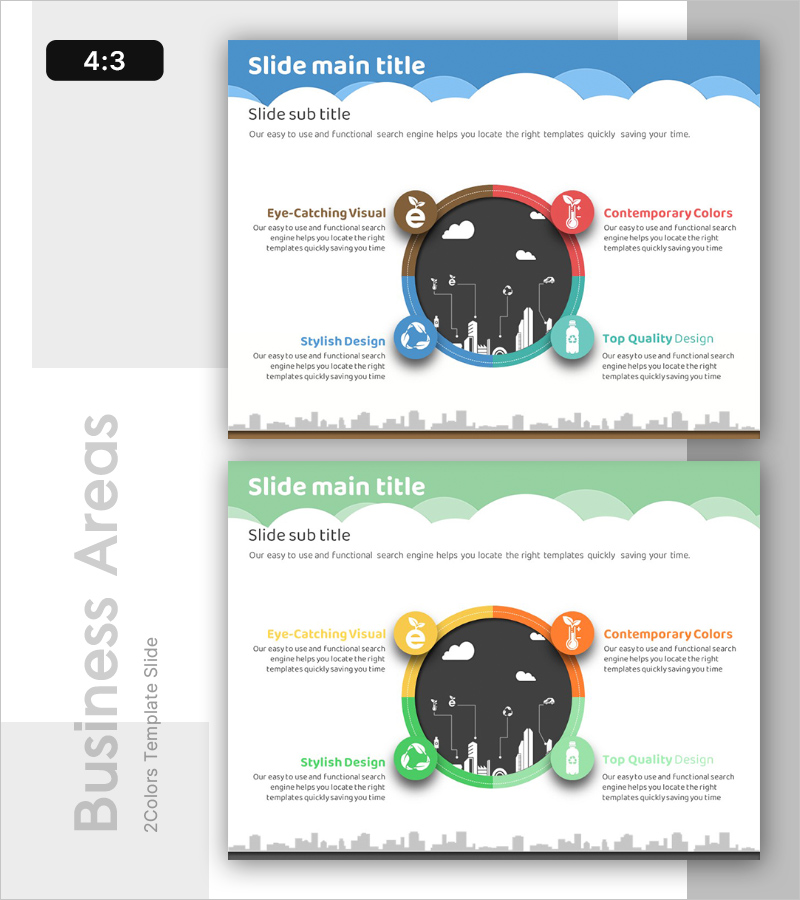
A PowerPoint slide featuring a central circular design with four radial icons and text areas arranged in four directions. The design uses a multi-color palette of blue, red, green, and teal, creating a visually balanced composition. This radial diagram structure is ideal for visualizing how a central concept branches into four key effects, impacts, or strategic pillars. The slide includes a city skyline background and is ready to use in business presentations, strategy reports, and corporate slideshows.
Usage Points
-
Main Usage
Visualizes how a central concept branches into four key effects, impacts, or strategic elements simultaneously. Ideal for presenting the ripple effect of green energy initiatives, four pillars of business strategy, or four core product values in a clear, hierarchical manner.
-
How to Use
Enter your central theme in the middle circle, then add corresponding effects or strategies in each of the four directional text areas. Customize the icon colors to represent different categories or priority levels. Use in strategy presentations, business reports, and product launch slideshows.
-
Recommended For
Executives, planning teams, marketing departments, and sales teams presenting strategic initiatives, business plans, or product value propositions. Particularly effective for sustainability, energy, environmental, and corporate social responsibility presentations where multi-directional impact needs emphasis.
-
Slide Structure
Central black circular background with city icons, surrounded by four directional colored circles (brown, red, blue, teal) with text areas. City skyline background at bottom. 4:3 aspect ratio with 2-slide set allowing flexible content combinations.
Related Products
-
Online Shopping Mall Delivery Process Diagram – Visual Enhancement for Operational Efficiency
#Business Introduction #Operational Plan #Diagram
-
Slide Design Inspiring Presentation
#Company Introduction #Business Introduction #Diagram
-
Soft Power Sector Diagram – Optimized for Business Introduction
#Company Introduction #Business Introduction #Diagram
-
Modern Business Presentation Template Diagram1 – Visualizing Business Strategy
#Business Introduction #Market and Competitor Analysis #Diagram
