Gear Illustration Template Cover
RB0100037
- Last Update 03/05/2025
- File Size 4.6MB
- # of Slides 2
- File Format PPTX
- Slide Ratio 4:3
- Color
Keywords
About the Product
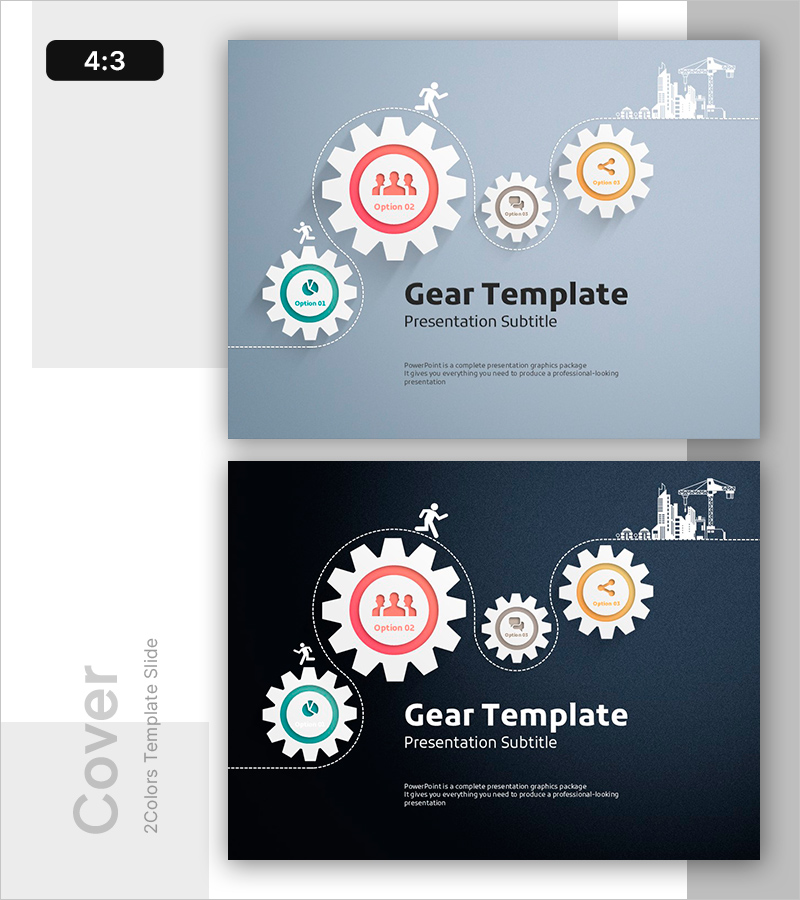
A professional cover slide featuring gear icons to visualize a 4-step process flow. This PowerPoint presentation template offers two color options: light blue and dark navy backgrounds, each with editable text areas in the gear circles for option names or step descriptions. The upper right corner includes a construction site illustration that enhances the business presentation's first impression. Delivered in 4:3 ratio PPTX format, this slide is ready for immediate editing and works perfectly as a cover page for corporate presentations, business proposals, project plans, and strategic initiatives.
Usage Points
-
Main Usage
Serves as the opening slide to immediately communicate your presentation topic and process flow. The interconnected gear structure visually represents sequential steps, interdependencies, and integrated systems, capturing audience attention from the first moment.
-
How to Use
Place this slide at the beginning of your presentation and customize the title, subtitle, and presenter information. Edit the text in each gear circle to reflect your specific process stages (Option 01–04), such as project phases, business objectives, or core values. Select the color option that best matches your corporate brand identity.
-
Recommended For
Ideal for business plans, proposals, project presentations, and corporate introductions. Particularly effective for topics involving phased implementation, process improvement, system integration, or strategic roadmaps. Recommended for presentations to executives, investors, and business partners seeking to establish credibility and professionalism.
-
Slide Structure
Two-slide set featuring light blue and dark navy background versions. Each slide contains four progressively larger gear icons arranged left to right, a central text area for title and subtitle, and a construction site illustration in the upper right corner. All elements are fully editable with flexible color customization options.