



Opening Session of the Learning Journey – Welcome and Introduction
RM0900012_4
- Last Update 03/04/2025
- File Size 2MB
- # of Slides 2
- File Format PPTX
- Slide Ratio 16:9
- Color
Keywords
- #Content-Based Slides
- #Design-Based Slides
- #Slide Type
- #Product/Service Introduction
- #Diagram
- #Program Introduction
- #Cluster
- #Chain Diagram
- #Welcome & Introduction
- #16:9
- #circular diagram PowerPoint
- #4-step connection diagram slide
- #educational journey template
- #process flow PowerPoint slide
- #diagram PowerPoint template download
About the Product
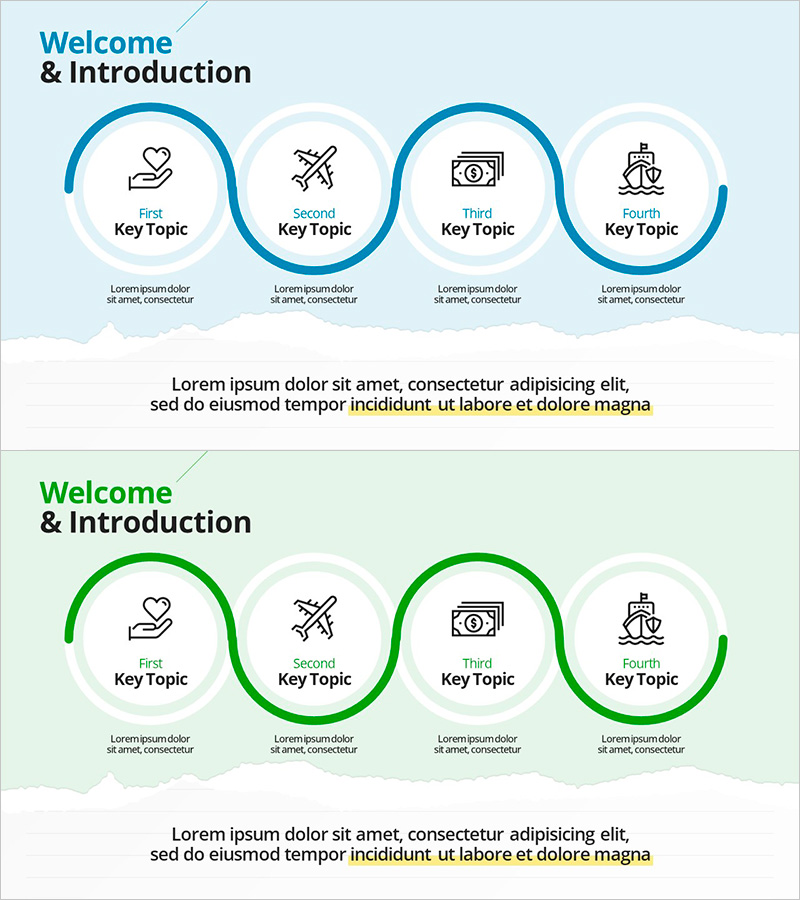
A 4-step circular connection diagram PowerPoint slide designed for opening sessions of educational journeys and learning programs. This presentation template features a dual-tone color scheme combining blue and green, with four icon-based nodes connected by curved flow lines in a circular pattern. Each stage includes dedicated areas for key topic titles and descriptive text, making it ideal for visualizing educational pathways, business processes, customer journeys, and cyclical workflows. The set includes 2 slides optimized for 16:9 widescreen format and is fully editable in PPTX format.
Usage Points
-
Main Usage
Visually communicate the 4-stage cyclical structure of an educational journey during opening sessions. Effectively illustrates business processes, customer experience cycles, product development stages, and organizational change management through a clear, repeating circular flow.
-
How to Use
Insert relevant icons into the node areas to represent each stage, then add stage titles in the 'Key Topic' text fields. Complete each stage by filling in detailed descriptions in the text areas below. You can maintain the existing blue-green color scheme or customize it to match your organization's brand colors.
-
Recommended For
Educators, organizational development specialists, marketing strategists, project managers, and business consultants explaining cyclical concepts. Particularly effective for educational program introductions, customer journey mapping, sustainable business model presentations, and continuous improvement frameworks.
-
Slide Structure
The 2-slide set features four circular nodes arranged in a continuous cycle, connected by curved flow lines. Nodes 1 and 3 are highlighted in darker colors (deep blue and deep green), while nodes 2 and 4 use lighter background tones for visual distinction. Each node contains an icon placeholder and 'Key Topic' text input area, with a descriptive text section positioned below the entire diagram.
Related Products
-
Career Seminar Introduction Slide – Growing Together
#Slide Type #Product/Service Introduction #Text Box
-
Finger Puzzle Diagram – Product and Service Introduction
#Product/Service Introduction #Business Vision and Strategy #Diagram
-
Exciting Performers and Connection Diagram
#Product/Service Introduction #Marketing Plan and Strategy #Diagram
-
Product/Service Introduction PowerPoint Template – Visually Captivating Design
#Product/Service Introduction #Diagram #Other
