



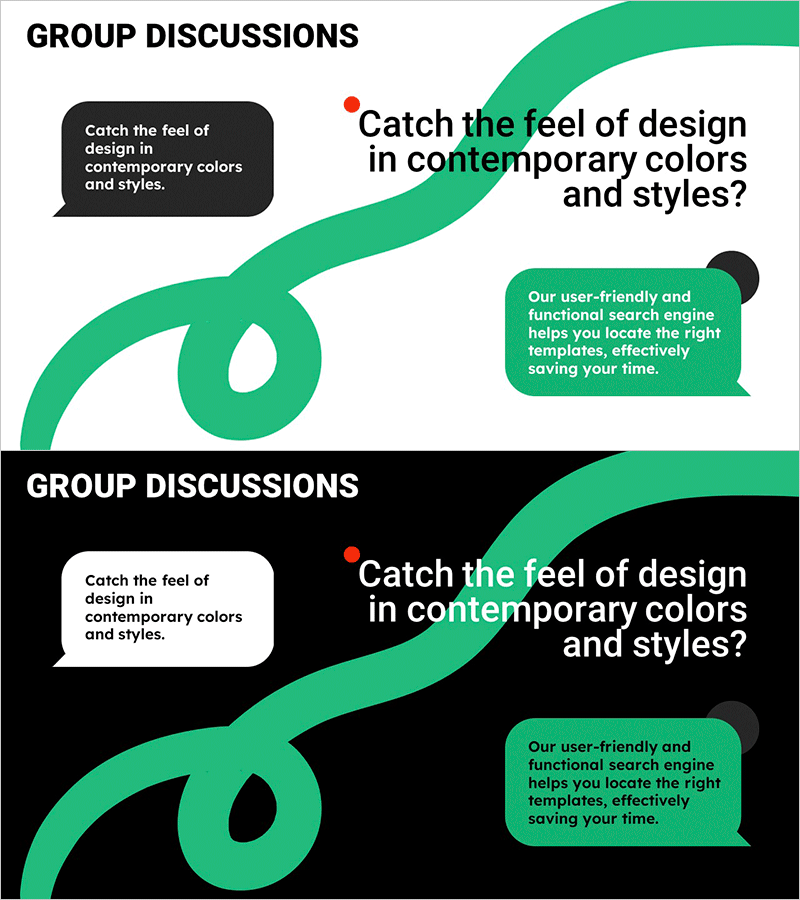
Line Drawing Theme Group Discussion Slides
RM0900001_16
- Last Update 03/02/2025
- File Size 0.5MB
- # of Slides 2
- File Format PPTX
- Slide Ratio 16:9
- Color
Keywords
- #Content-Based Slides
- #Design-Based Slides
- #Business Vision and Strategy
- #Text Box
- #Business Background and Necessity
- #Speech Bubble
- #16:9
- #group discussion PowerPoint slide
- #team meeting presentation template
- #line drawing discussion slide
- #how to present group discussions in PowerPoint
- #meeting agenda PPT
About the Product
A 2-slide PowerPoint presentation template designed to visualize group discussions and team meetings. Features a white background with green curved line-drawing elements, complemented by a black speech bubble on the left and a green speech bubble on the right to represent dialogue flow. Each slide includes one title input area and two text areas for capturing discussion topics, opinions, and outcomes. Ideal for business vision presentations, team meetings, training seminars, and any speaking scenario requiring collaborative discussion visualization.
Usage Points
-
Main Usage
Visually represent team discussions, group meetings, and collaborative decision-making processes. The contrasting black and green speech bubbles effectively convey opinion exchange and consensus-building, making it ideal for business strategy presentations and team alignment sessions.
-
How to Use
Enter the discussion topic in the title area of each slide. Add the first viewpoint in the left black speech bubble and the second viewpoint in the right green speech bubble. The line-drawing background is fixed, so you only need to edit the text. Color adjustments can be made easily if needed.
-
Recommended For
Team leaders, project managers, educators, business consultants, and facilitators presenting collaborative outcomes or decision-making processes. Perfect for startup pitches, internal team meetings, training program presentations, and workshop facilitation materials.
-
Slide Structure
2-slide layout with each slide containing one title input area, one left-side black speech bubble text field, and one right-side green speech bubble text field, totaling three text input areas per slide. Consistent line-drawing curved background maintains visual unity across both slides.
Related Products
-
Layout Design Template – Customer Success Cases and Strategy
#Business Vision and Strategy #Customer Success Stories #Text Box
-
Presentation Template Highlighting Business Necessity – Effective Message Delivery
#Product/Service Introduction #Business Introduction #Business Vision and Strategy
-
Business Background Text Box Diagram
#Business Introduction #Business Vision and Strategy #Text Box
-
Visualizing Construction Field Objectives with Business Diagram
#Business Vision and Strategy #Diagram #Business Goals
