



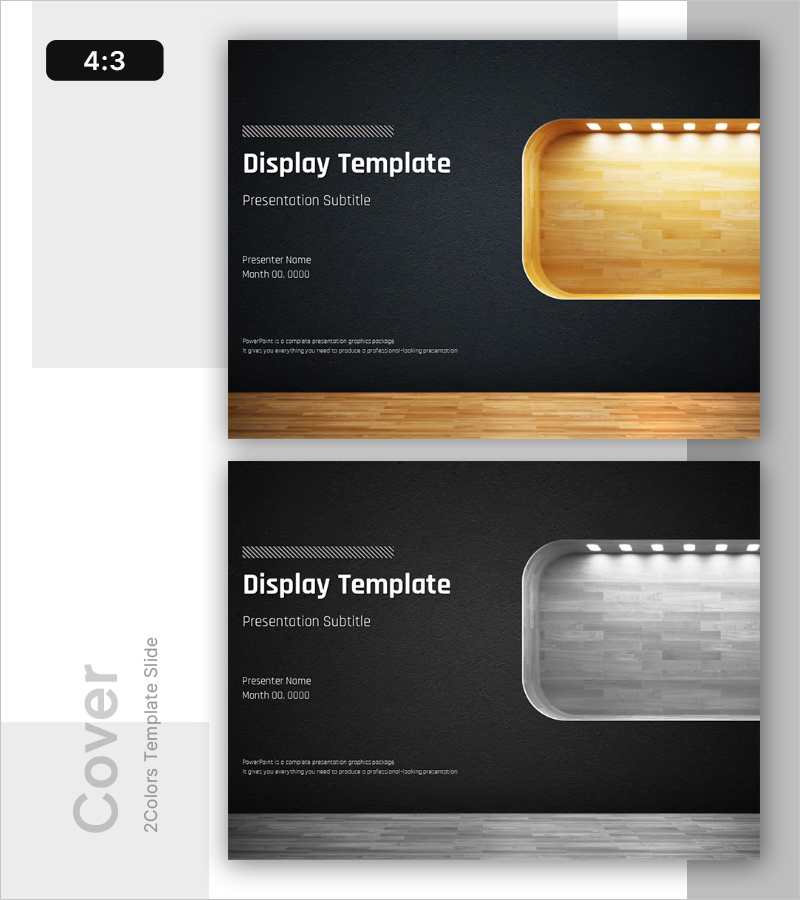
Display PPT Cover – Professional First Impression
RB0100001
- Last Update 02/28/2025
- File Size 6MB
- # of Slides 2
- File Format PPTX
- Slide Ratio 4:3
- Color
Keywords
About the Product
A professional cover slide that sets the tone for your entire presentation with a striking display design. This PowerPoint slide features a dark charcoal background paired with wood-tone display boxes in two color variations. The layout includes clearly defined areas for title, subtitle, presenter name, and date, making it instantly applicable to any business presentation. Provided in 4:3 aspect ratio PPTX format, the balanced composition between logo space and text areas reinforces corporate credibility. Perfect for company introductions, proposals, business plans, investment pitches, and all professional presentations requiring a strong opening impression.
Usage Points
-
Main Usage
Create a powerful opening for your presentation with this cover slide featuring a distinctive wood-tone display box and dark background contrast. The systematic arrangement of presenter name, date, and subtitle fields establishes professional credibility from the first slide.
-
How to Use
Edit the title, subtitle, presenter name, and date fields in the slide master to match your presentation details. Choose between the two color variations (wood tone or gray tone) based on your presentation topic and corporate branding. Insert your company logo in the designated logo space to enhance brand consistency throughout the presentation.
-
Recommended For
Ideal for company introductions, proposals, business plans, investment pitches, marketing presentations, product introductions, and all corporate presentations. Particularly suited for B2B presentations, executive briefings, and client-facing presentations where corporate credibility and professionalism are essential.
-
Slide Structure
Two-slide set featuring wood-tone display box version and gray-tone version. Each slide divides the layout into left-side text input areas (title, subtitle, presenter name, date) and right-side large display box space for logo or key image insertion, enabling flexible customization.
Related Products
-

Prospective Business Plan Template Cover – Vision for Success
#Slide Type #Cover
-
Standard Investment Attraction PPT Template Cover – Showcasing Investment Appeal
#Slide Type #Cover
-

Hospital Company Profile Template Cover – Image of Trust and Professionalism
#Slide Type #Cover
-
Best Partnership Proposal Cover
#Slide Type #Cover
