



Step-by-step Schedule Planning Slide – Fundamentals of Project Management
RM0400001_20
- Last Update 02/14/2025
- File Size 0.4MB
- # of Slides 2
- File Format PPTX
- Slide Ratio 16:9
- Color
Keywords
- #Content-Based Slides
- #Design-Based Slides
- #Business Strategy
- #Business Management
- #Diagram
- #Step-by-Step Schedule Plan
- #Execution Plan
- #Cluster
- #Chain Diagram
- #16:9
- #circular diagram PowerPoint
- #5-step process slide
- #project management PowerPoint template
- #schedule planning diagram
- #business execution strategy slide
About the Product
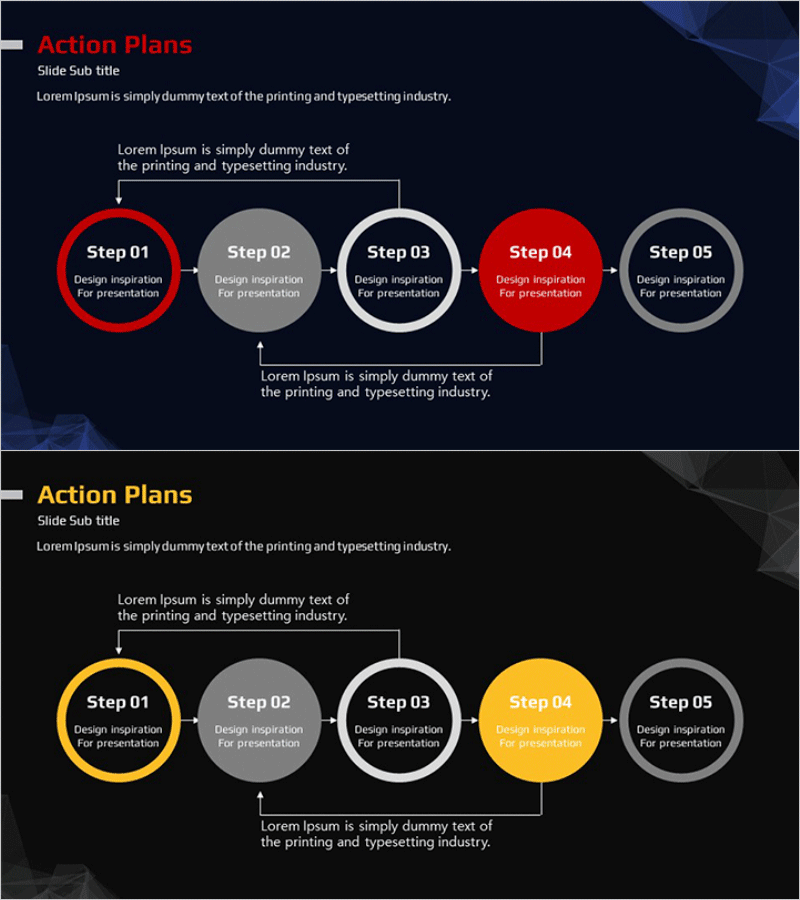
A 5-step circular diagram PowerPoint slide designed to visualize project management and business execution strategies. The slide uses red, gray, and white accent colors to clearly represent sequential progress, with arrow connectors forming a circular flow and feedback loop structure. Each step includes dedicated text areas for detailed descriptions, making it ideal for documenting project phases, timelines, action plans, and role assignments. The 2-slide set is ready to use immediately in presentations, reports, and strategic planning documents.
Usage Points
-
Main Usage
Effectively visualizes project management phases and circular process flows. Ideal for presenting business execution strategies, project timelines, process workflows, and continuous improvement cycles in a clear, structured format that audiences can easily follow.
-
How to Use
Enter step names (Step 01–05) in each circular node and add corresponding objectives, activities, and responsibilities in the description areas below. Use red-highlighted steps to indicate current project status or critical phases. Arrow connectors emphasize the circular flow and progression to the next stage.
-
Recommended For
Project managers, business planning teams, marketing professionals, and consultants presenting project schedules, business strategies, process improvements, and quality management cycles. Suitable for executive reports, team meetings, and client proposals.
-
Slide Structure
Five circular nodes arranged horizontally from left to right, connected by arrows forming a circular flow pattern. First and fourth nodes are highlighted in red; others in gray and white. Includes top descriptive text box and bottom explanation area for two-level information hierarchy.
Related Products
-

Effective Diet Method - Realizing Through Step-by-Step Planning
#Business Strategy #Business Management #Diagram
-
Marketing Plan Flow Analysis Chart – Step-by-Step Execution Plan
#Business Strategy #Business Management #Diagram
-
Step-by-Step Learning Progress – Step 4 of the Structured Learning Path
#Business Strategy #Business Management #Diagram
-
Practical Steps to Improve Your Fitness – Actionable Execution Strategy
#Business Strategy #Business Management #Diagram
