



Setting Business Goals for Key Partners - Strategic Partnerships
RM0300019_19
- Last Update 02/12/2025
- File Size 0.6MB
- # of Slides 2
- File Format PPTX
- Slide Ratio 16:9
- Color
Keywords
About the Product
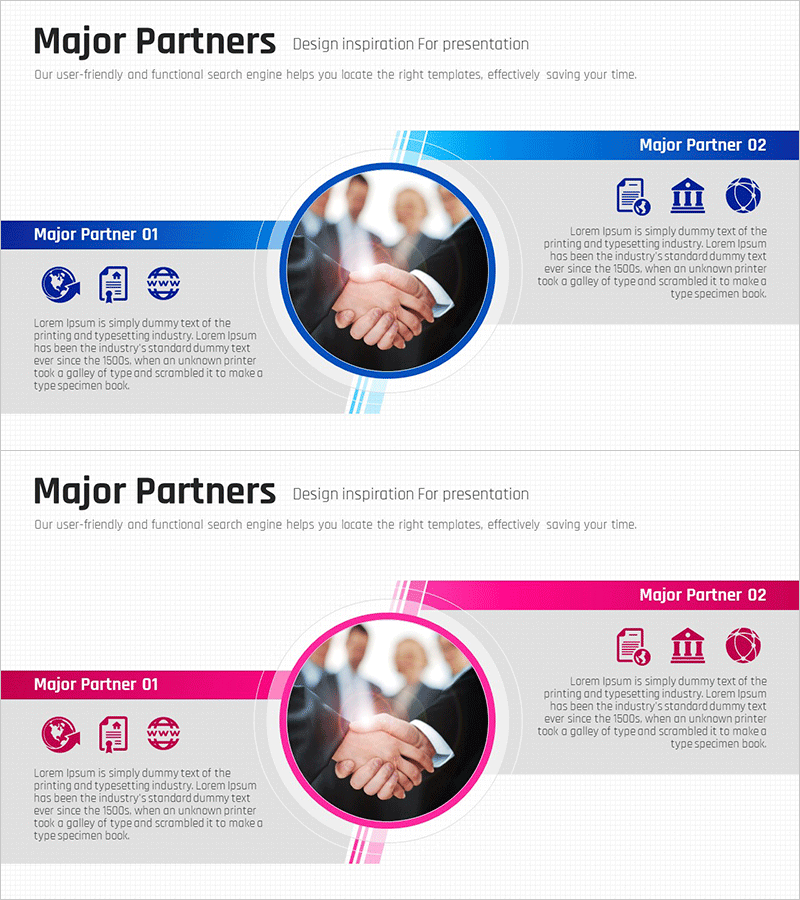
A professional PowerPoint slide designed to showcase key business partners and strategic partnerships effectively. The two-column comparison layout presents Partner 01 and Partner 02 side by side, each featuring three logo spaces, a circular image area, and dedicated text description zones. The design uses blue or pink accent bars and angled lines to create a contemporary visual style, making it ideal for company presentations, business plans, and investor pitch decks where partner credibility and collaboration scope need emphasis. Available in 16:9 widescreen format, PPTX file type, fully editable and ready to customize.
Usage Points
-
Main Usage
This slide effectively communicates a company's key partnerships and collaboration network to build business credibility. The two-column structure balances information about each partner, allowing investors, clients, and stakeholders to quickly understand the scope and diversity of your partnership ecosystem.
-
How to Use
Place this slide in the 'Key Partners' section of company presentations, 'Partnership Strategy' in business plans, or 'Credibility & Trust' segments of investor pitches. Insert partner logos in designated spaces and fill text areas with collaboration details, business domains, partnership duration, and mutual value propositions.
-
Recommended For
Business development teams, investor relations managers, and corporate executives presenting partnership portfolios. Ideal for startups highlighting strategic alliances, enterprises showcasing supplier networks, consortium announcements, and any situation where partner credibility strengthens your business narrative.
-
Slide Structure
The slide contains a title area, left Partner 01 section with three logo spaces, circular image placeholder, and text block, and right Partner 02 section with identical layout. Blue or pink accent bars and angled lines visually separate the two columns while maintaining symmetrical balance across the entire slide composition.
Related Products
-
Hologram Wide PPT Mockup2 – Maximizing Visual Appeal
#Product/Service Introduction #Other #Composition
-
Concise Slide Template to Present Product Advantages
#Product/Service Introduction #Diagram #Composition
-
Colorful Paint Splash Template Diagram – Product and Service Introduction
#Product/Service Introduction #Diagram #Composition
-
Resort Activity Program Presentation Slide
#Product/Service Introduction #Diagram #Composition
