



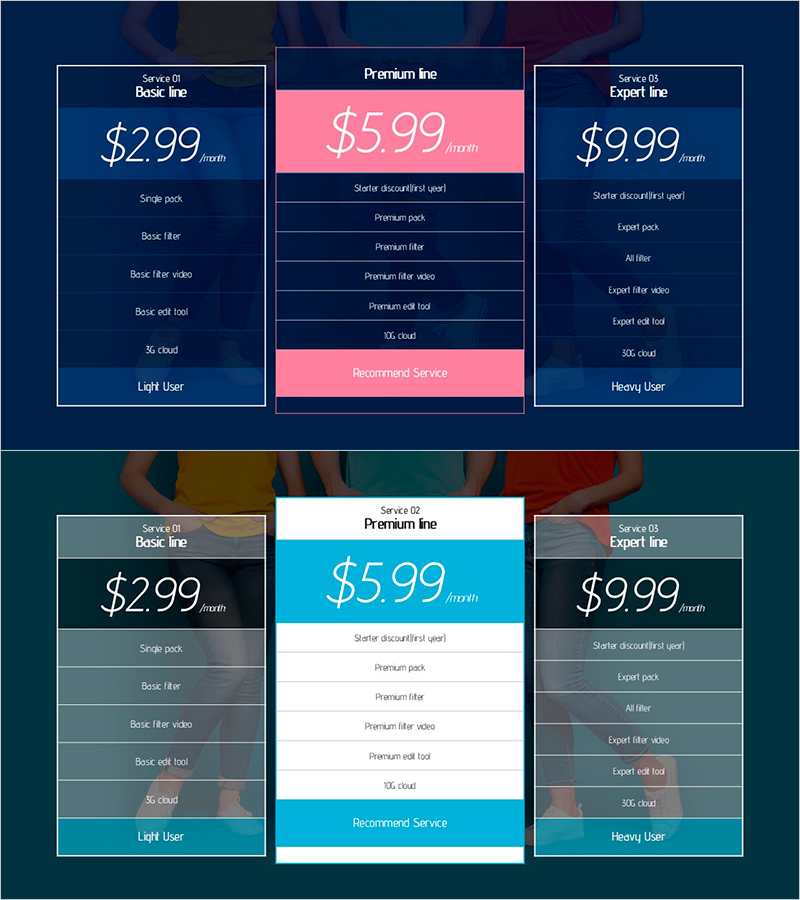
Comparison of Subscription Services - Diagram for Design and Feature Enhancement
RJ0800049_14
- Last Update 08/29/2025
- File Size 1.3MB
- # of Slides 2
- File Format PPTX
- Slide Ratio 16:9
- Color
Keywords
About the Product
A PowerPoint slide that compares subscription service pricing and features across three tiers: Basic line (left), Premium line (center), and Expert line (right). Each column contains dedicated text areas for service name, price, feature list, and recommended user type. The layout uses a dark blue background with pink accent color highlighting the Premium option in the center, making it ideal for sales presentations and service proposals. Available in 16:9 PPTX format for immediate editing and customization.
Usage Points
-
Main Usage
This slide visualizes SaaS, subscription-based services, and membership plan pricing alongside features in a three-column structure. The pink accent color emphasizes the Premium option in the center, helping audiences quickly understand the differences between each pricing tier.
-
How to Use
Use this slide in sales proposals, product presentations, and service overview decks to explain pricing tiers. Simply fill in the text areas with actual prices, feature lists, and target user descriptions, then adjust colors to match your brand identity as needed.
-
Recommended For
Ideal for SaaS companies, subscription service providers, and membership program operators presenting to sales teams, marketing departments, investors, and customers. Perfect for pitch decks, client presentations, and internal strategy meetings.
-
Slide Structure
Three-column layout with each column containing service name, price display area, feature list (5-6 items), and recommended user information. The center Premium column features a pink background for emphasis, while the left Basic and right Expert columns use dark blue backgrounds for visual distinction.
Related Products
-
Circular Gradient Wide Template Diagram – Benefits and Features
#Product/Service Introduction #Diagram #Benefits and Advantages
-
Pricing Plan PowerPoint Slide – 3-Card with Recommend Badge
#Product/Service Introduction #Diagram #Composition
-
Social and Environmental Importance of Education – Towards a Sustainable Future
#Product/Service Introduction #Business Vision and Strategy #Diagram
-
Children's Media Diagram – Infusing Creativity and Fun
#Product/Service Introduction #Diagram #Features
