



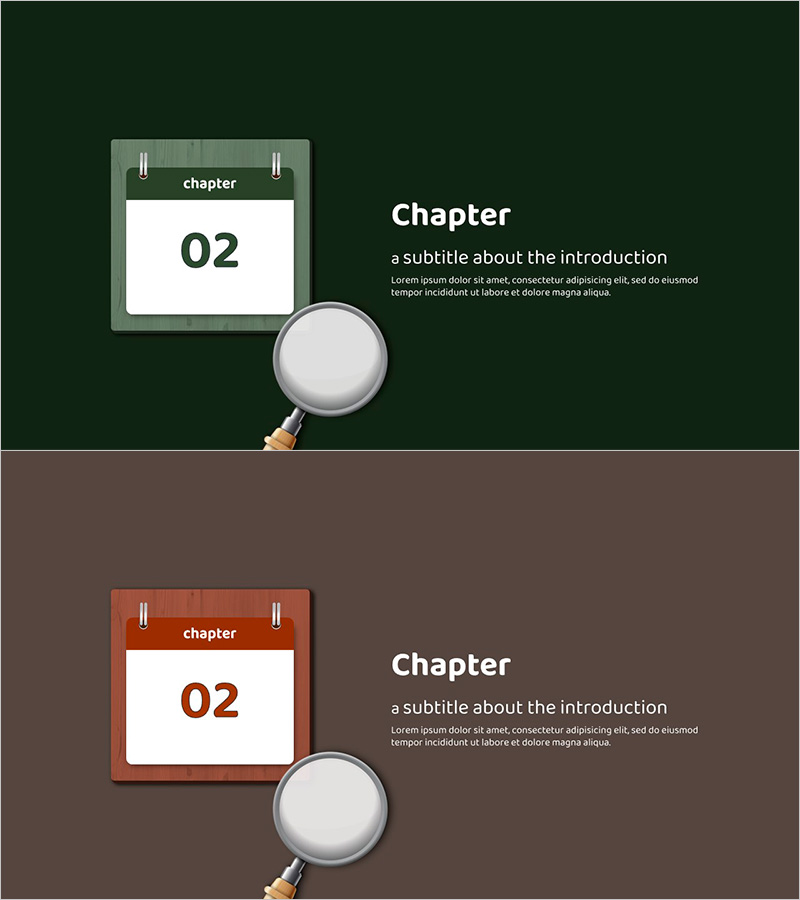
Calendar Magnifier Slide – Chapter Presentation
RJ0500017_12
- Last Update 08/27/2025
- File Size 0.8MB
- # of Slides 2
- File Format PPTX
- Slide Ratio 16:9
- Color
Keywords
About the Product
A professional chapter divider PowerPoint slide that emphasizes section breaks in presentations. This slide features a distinctive visual combining a magnifying glass and calendar icon to effectively mark chapter transitions. Available in two color versions—dark green and brown—each with a white background chapter number input area. The 2-slide set is ready to use as chapter opening pages in business reports, educational materials, proposals, and presentations. Formatted in 16:9 widescreen PPTX, compatible with all modern PowerPoint versions. The layout includes dedicated text zones for chapter numbers and subtitles, making it easy to customize for any document structure.
Usage Points
-
Main Usage
This slide serves as a visual chapter opener that captures audience attention and clearly marks document structure transitions. The magnifying glass and calendar icon combination creates a memorable visual anchor for each new section, making it ideal for multi-chapter business reports, educational presentations, proposals, and strategic documents.
-
How to Use
Insert at the beginning of each chapter to signal section transitions. Enter the chapter number in the dedicated input area and add subtitles as needed. Use the dark green version for professional business documents requiring authority and trust; choose the brown version for educational or community-focused materials with a warmer tone.
-
Recommended For
Recommended for business analysts, educators, consultants, and project managers creating structured multi-section presentations. Ideal for corporate reports, business plans, investment proposals, educational seminars, academic presentations, and consulting deliverables where clear chapter separation enhances document navigation.
-
Slide Structure
2-slide set with one version per slide, allowing flexible application across chapters. Layout includes chapter label at top, large chapter number field (white background) in center, magnifying glass icon on left, and text zone on right for title and subtitle, creating clear information hierarchy.
Related Products
-
Library-Themed Education Template Section
#Slide Type #Section Cover
-
Architectural Plan PPT Template – Professional Presentation Design
#Slide Type #Section Cover
-
Mobile App Research Template Divider Slide
#Slide Type #Section Cover
-
Section Divider for Mobile Banking Strategy Presentation
#Slide Type #Section Cover
