



Construction Project Schedule Slide Template - Combining Visualization and Practicality
RJ0900034_29
- Last Update 08/26/2025
- File Size 1.6MB
- # of Slides 2
- File Format PPTX
- Slide Ratio 16:9
- Color
Keywords
- #Content-Based Slides
- #Design-Based Slides
- #Business Management
- #Operational Plan
- #Diagram
- #Implementation Schedule
- #Project Implementation Schedule
- #Table
- #Standard Table
- #16:9
- #project schedule PowerPoint slide
- #timeline management presentation template
- #calendar table diagram
- #project planning PPT
- #construction project schedule template
About the Product
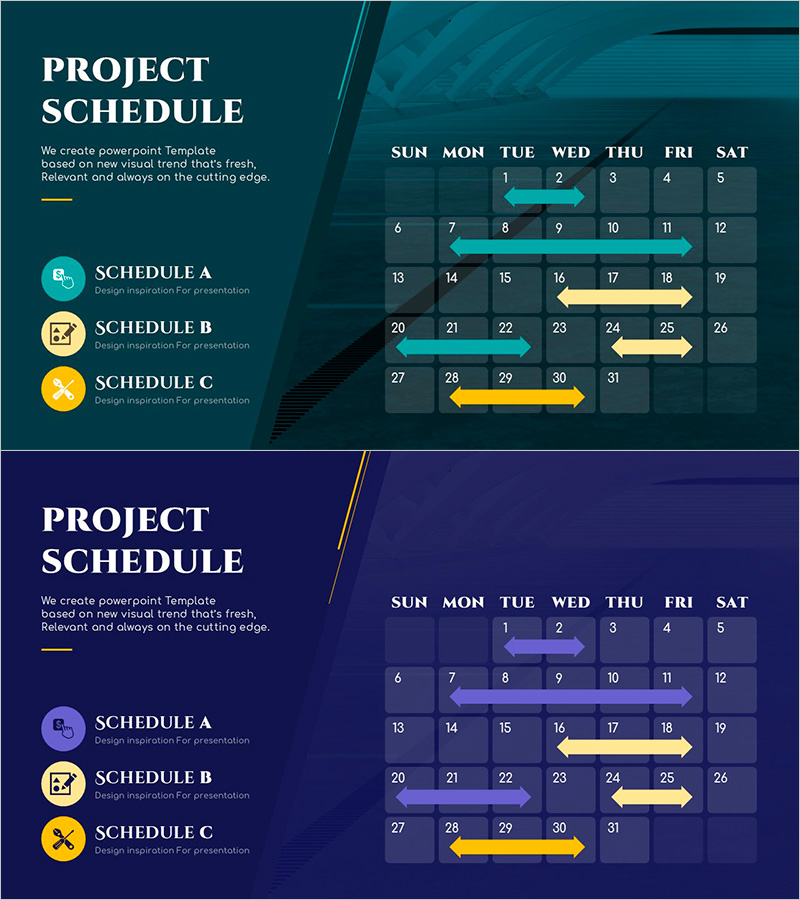
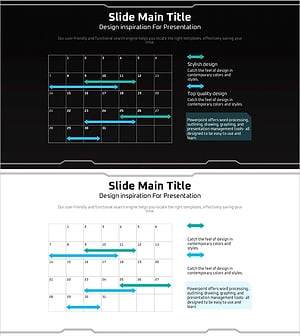
A 2-slide PowerPoint presentation for visualizing construction, IT, and marketing project schedules with clarity and precision. The layout features a monthly calendar-style table on the right side with teal, yellow, and purple arrows marking different project phases and timelines. The left side displays three categorized icons (schedule, documentation, objectives) to classify project stages, while the calendar grid shows start and end dates using directional arrows. This slide template is ready for immediate use in project kickoff meetings, status reports, and stakeholder presentations, enabling effective team collaboration and timeline communication.
Usage Points
-
Main Usage
Communicate monthly project timelines to team members and stakeholders using an intuitive calendar-based table format. Color-coded arrows distinguish concurrent and sequential tasks, providing clear visibility into project phases and dependencies.
-
How to Use
Deploy in project kickoff meetings, weekly status updates, and monthly review presentations to explain current progress and upcoming milestones. Customize the left-side icon labels to match your project phases and adjust calendar arrow dates to reflect actual timelines.
-
Recommended For
Project managers, team leads, and directors in construction, real estate, IT, marketing, and manufacturing sectors. Ideal for business proposals, project charters, monthly reports, and quarterly review presentations.
-
Slide Structure
Both slides share identical layout: left title area (PROJECT SCHEDULE) with 3 categorized icons and labels, right side features a 7-column (days of week) × 5-row (weeks) calendar grid with 35 date cells, plus 3 directional arrows (teal, yellow, purple) spanning 2–4 day intervals. Dark background (teal and navy) maintains visual consistency.
Related Products
-
Overseas Travel Business Promotion Schedule Plan – Effective Preparation Strategies
#Business Management #Operational Plan #Diagram
-
Displays the Schedule Step by Step – Clear Communication of Project Timeline
#Business Management #Operational Plan #Diagram
-
Orange Hexagon Presentation Template Schedule Table – Essential Tool for Sleek Business Management
#Business Management #Operational Plan #Implementation Schedule
-
Geometry PPT Template Wide Schedule – Essential for Project Management
#Business Management #Operational Plan #Diagram
