Architectural Facilities Planning PPT Cover – Professional Design
RJ0900015
- Last Update 08/20/2025
- File Size 0.7MB
- # of Slides 2
- File Format PPTX
- Slide Ratio 16:9
- Color
Keywords
About the Product
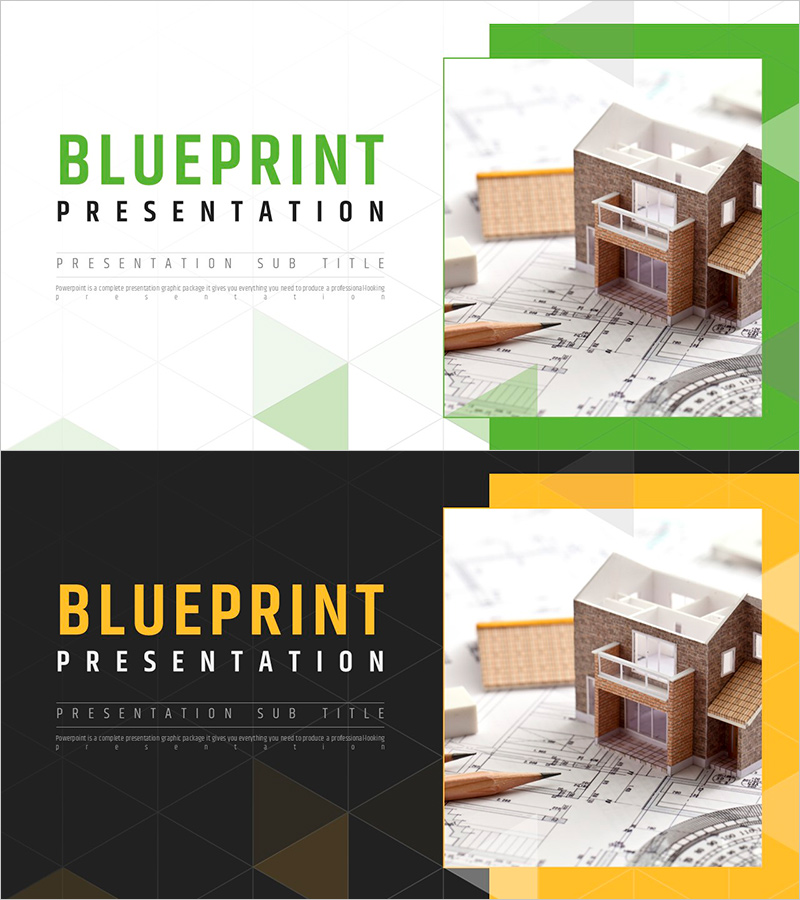
A 2-slide cover set designed for architectural facilities planning presentations. The geometric layout features green and yellow two-tone colors that emphasize the professionalism of construction projects. The left text area accommodates title, subtitle, and description, while the right side displays an architectural model and blueprint image, visually representing the practical nature of facilities planning. Available in editable PPTX format, suitable for architecture, facilities, real estate, and construction industry presentations.
Usage Points
-
Main Usage
This cover slide establishes the first impression for architectural facilities planning projects. The green and yellow two-tone color scheme combined with architectural model and blueprint imagery communicates both technical expertise and professional credibility. Ideal for investor pitches, client presentations, and stakeholder meetings where project reliability must be visually reinforced.
-
How to Use
Enter project name, subtitle, and presenter information in the left text area. Replace the right image section with architectural models, blueprints, or construction photos as needed. Adjust the geometric background colors to match corporate branding. Use the 2-slide set as a cover and back page, or as section dividers throughout the presentation.
-
Recommended For
Architects, facilities engineers, construction project managers, real estate professionals, construction company sales teams, architectural design firms, and architecture students. Perfect as a cover for architectural facilities plans, construction proposals, and project reports to enhance document credibility.
-
Slide Structure
Two-slide layout with each slide divided into a left text input area (title, subtitle, description in three tiers) and a right image placement zone. The green and yellow two-tone geometric background is applied differently on each slide, allowing flexible use as cover pages, back pages, or section dividers.