



Building Template Contact – Company Introduction Slide
RJ0900004_29
- Last Update 08/16/2025
- File Size 4.5MB
- # of Slides 2
- File Format PPTX
- Slide Ratio 16:9
- Color
Keywords
About the Product
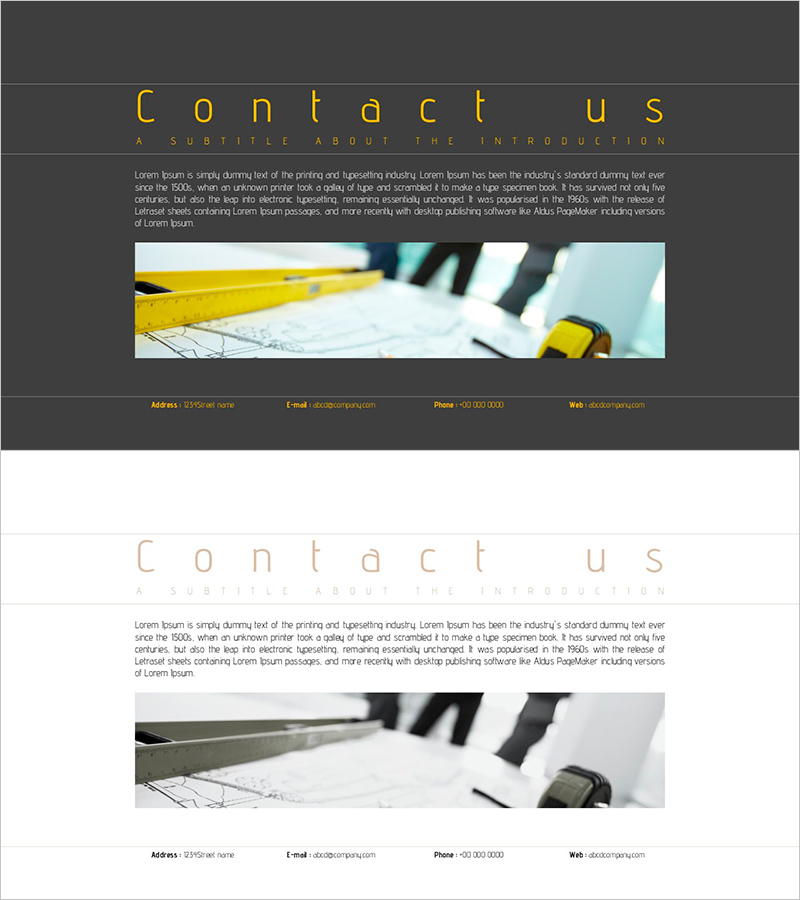
A professional contact slide optimized for the closing section of company introduction presentations. This 2-slide PowerPoint deck features a dark gray background with gold typography, clearly displaying four contact elements: address, email, phone, and website. The left side incorporates a building image to visually convey corporate credibility and expertise. Designed in 16:9 widescreen format, all text fields are fully editable for immediate use. Perfect for corporate presentations, company profile pitches, and investor meetings.
Usage Points
-
Main Usage
Serves as the closing section of company introduction presentations, professionally presenting corporate contact information. The dark gray and gold color combination conveys trust and premium brand image while providing clear contact details for investors, partners, and clients.
-
How to Use
Place this slide at the end of company profile presentations, corporate decks, or investor materials. Input actual contact information in the address, email, phone, and website fields. Optional: add company logo or QR code for enhanced engagement. Allow sufficient presentation time for audience to note contact details.
-
Recommended For
Executive presentations, investor meetings, partnership proposals, corporate training materials, and business development pitches. Particularly suitable for B2B companies in construction, real estate, engineering, consulting, and professional services sectors.
-
Slide Structure
Two-slide layout with the first slide featuring a dark gray background, 'Contact us' title, subtitle, descriptive text, and building image. The second slide displays four contact items (address, email, phone, website) in horizontal arrangement for optimal information readability and visual balance.
Related Products
-
Slide for Product Developer Contact Information
#Company Introduction #Other #Contact Information
-
Computer Mockup for Contact Slide – Highlighting Professionalism
#Company Introduction #Other #Contact Information
-
Game Development Team Contact Information – Connect with Us
#Company Introduction #Contact Information
-

Science DNA Business Overview Slides
#Company Introduction #Contact Information
