



Section Cover Slide Template – Attractive Intro
RJ0600100_20
- Last Update 07/18/2025
- File Size 9.1MB
- # of Slides 2
- File Format PPTX
- Slide Ratio 16:9
- Color
Keywords
About the Product
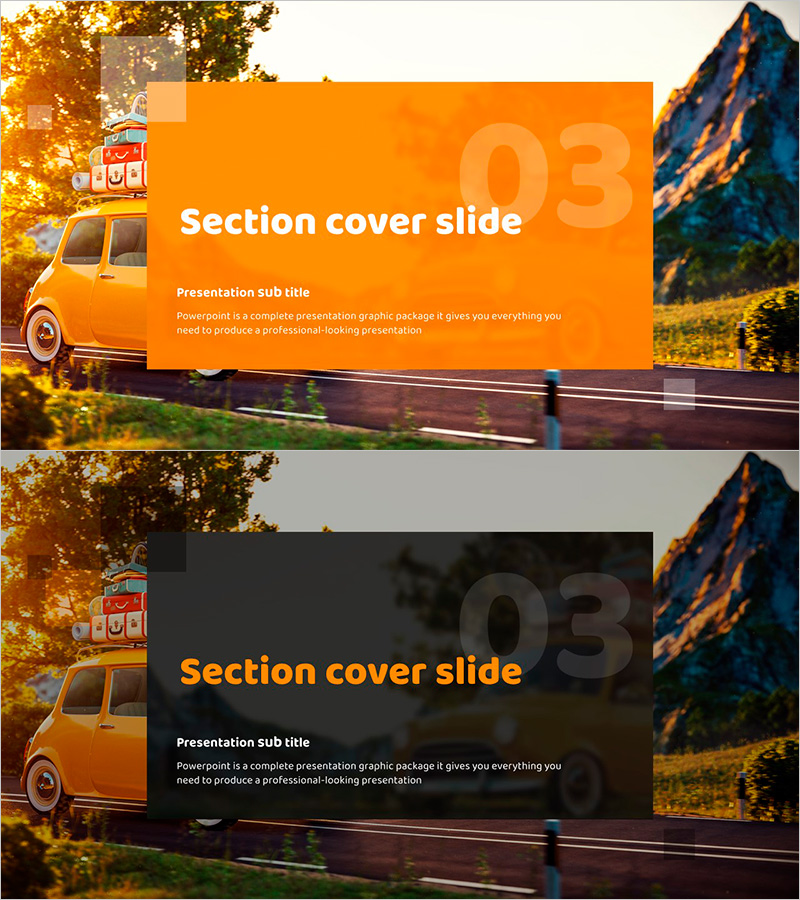
A 2-slide PowerPoint presentation template designed to effectively mark section transitions with visual impact. Features an orange background with white typography, complemented by a vintage car image on the left and mountain landscape on the right. The first slide uses a bright orange overlay for high readability, while the second applies a dark semi-transparent overlay to emphasize the background imagery. Clear title and subtitle input areas enable immediate editing, and the 16:9 widescreen format is optimized for modern presentation environments. Fully customizable in PowerPoint format—adjust colors, text, and background images to match your presentation theme.
Usage Points
-
Main Usage
Marks major section transitions in presentations with visual emphasis, refocusing audience attention and signaling content shifts. Ideal for business plans, proposals, company profiles, and marketing decks where clear section delineation enhances message clarity and maintains engagement throughout longer presentations.
-
How to Use
Insert this slide at the beginning of each new presentation section to signal content transitions. Enter the section title (e.g., 'Business Strategy', 'Marketing Plan') in the title area and a brief summary in the subtitle field. Replace the background image to match your presentation topic, and adjust the orange overlay transparency to optimize readability for your specific content and venue lighting.
-
Recommended For
Business plans, proposals, company profiles, marketing presentations, investor pitch decks, and any multi-section presentation requiring clear visual breaks. Particularly effective for lengthy presentations where maintaining audience focus and clarifying content flow are critical to presentation success.
-
Slide Structure
Two-slide layout with distinct overlay treatments: Slide 1 features a bright orange overlay (low transparency) for maximum text readability, while Slide 2 applies a dark semi-transparent overlay (high transparency) to emphasize background imagery. Both slides include dedicated title input area (top center), subtitle input area (center), and full-bleed background image area for maximum visual impact.
Related Products
-
Multipurpose Business Plan Template Section Slide – Professional and Clean Design
#Slide Type #Section Cover
-
Business Plan PowerPoint Template – Stylish Composition
#Slide Type #Section Cover
-
Modern Simple Proposal Template Section Slide
#Slide Type #Section Cover
-

Chess Themed Business Strategy Template Section Slide
#Slide Type #Section Cover
