



Frame Boxes and Check Boxes – Ideal for Operational Planning and Risk Management
RJ0600092_28
- Last Update 07/15/2025
- File Size 0.8MB
- # of Slides 2
- File Format PPTX
- Slide Ratio 16:9
- Color
Keywords
- #Content-Based Slides
- #Design-Based Slides
- #Operational Plan
- #Risk Management and Regulatory Compliance
- #Text Box
- #Business Support Plan
- #Legal and Regulatory Compliance
- #Rectangle Text Box
- #16:9
- #frame box PowerPoint slide
- #check box slide design
- #operational planning PPT
- #risk management slide
- #dark blue layout template
About the Product
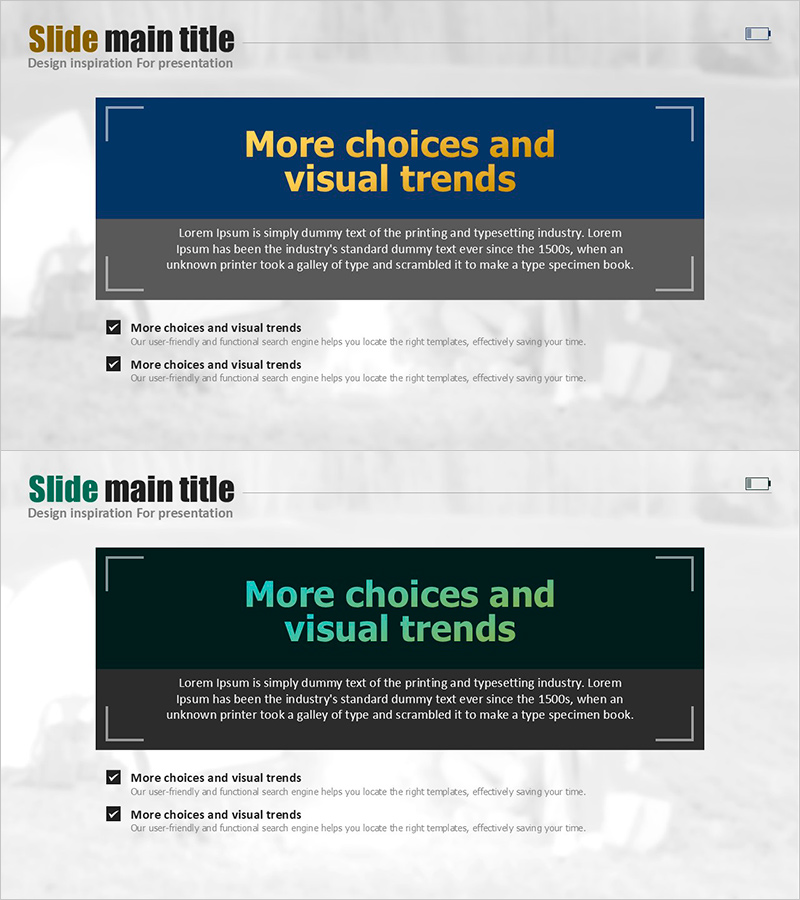
A professional PowerPoint slide template optimized for operational planning and risk management sections. Featuring a dark blue background with golden-yellow titles and gray text boxes across 2 slides, each slide is divided into an upper highlight area and a lower checklist section. Decorative corner lines on the left and upper right add sophistication to your presentation. With ample text input space, you can clearly list policies, strategies, and risk items. Ready to use immediately in business presentations and planning documents.
Usage Points
-
Main Usage
Systematically organize and present operational planning and risk management items in your presentation. Use the upper highlight area for key policies or strategies, and the lower checklist section for detailed action items or risk factors to clearly demonstrate decision-making rationale.
-
How to Use
Enter section names (e.g., Operational Strategy, Risk Factors) in the upper golden title area and write specific content in the gray text boxes. Use checkboxes to mark completed items, progress status, or inspection points while maintaining the professional dark blue background and delivering information in a hierarchical manner.
-
Recommended For
Ideal for executive reports, business plans, investment pitch decks, and strategy meeting materials when explaining operational policies, implementation plans, and risk factors. Particularly suitable for executives, decision-makers, and project managers in finance, manufacturing, IT, and consulting industries.
-
Slide Structure
2-slide set where each slide features an upper highlight box (golden title with gray description area) and a lower checklist section (2-3 checkbox items). Decorative corner lines on the left and upper right provide visual balance, with ample text space to clearly distinguish policies, strategies, and risk items.
Related Products
-
Green & Gray Template Wide Closed Diagram
#Business Management #Operational Plan #Diagram
-
Green Isometric Execution Plan – Effective Business Management
#Business Management #Operational Plan #Diagram
-
What to Observe During the Holiday Season – Legal Compliance Template
#Risk Management and Regulatory Compliance #Text Box #Legal and Regulatory Compliance
-
Water Resources Wide Presentation Template – Operations and Technology Development
#Operational Plan #Text Box #Production and Technology Development Strategy
