



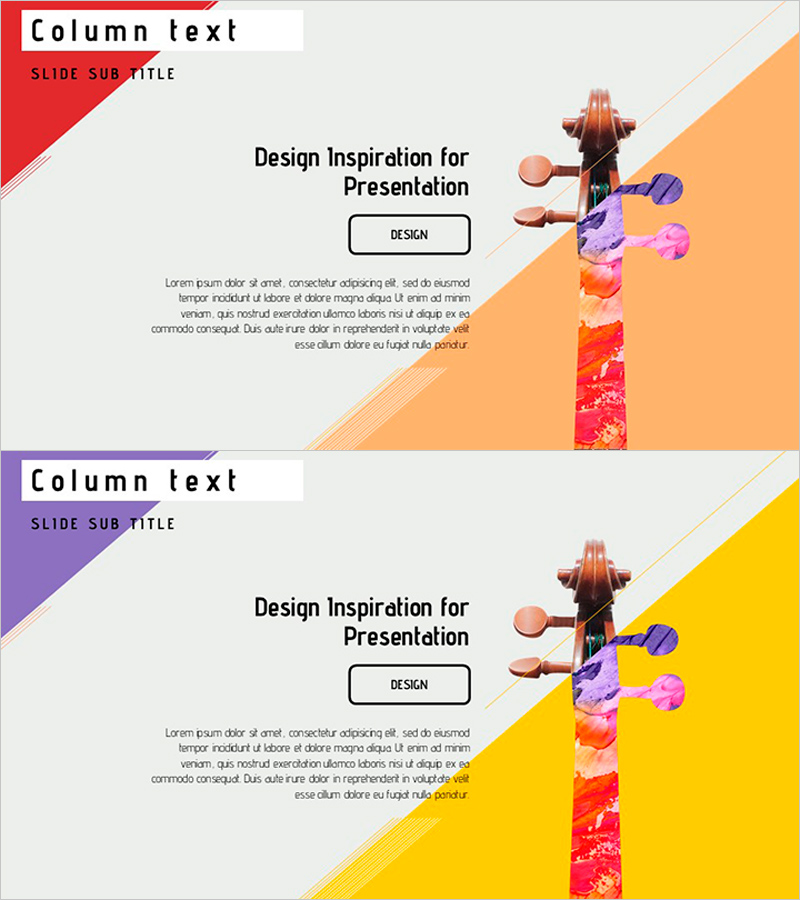
Instrument Silhouette and Column - Product Introduction
RJ0600064_13
- Last Update 07/07/2025
- File Size 1MB
- # of Slides 2
- File Format PPTX
- Slide Ratio 16:9
- Color
Keywords
About the Product
A product and service introduction PowerPoint slide featuring an instrument silhouette and column structure. The 2-slide design uses contrasting orange and yellow backgrounds to emphasize the central instrument image, effectively communicating product features and core value. The left column text area allows detailed descriptions, while the central button element highlights key messages. Available in 16:9 widescreen PPTX format for immediate editing. Perfect for product presentations, service introductions, and portfolio showcases.
Usage Points
-
Main Usage
This slide effectively highlights product and service features through visual design. The unique instrument silhouette element expresses creativity while the left column text area provides clear, detailed product information. The central button element is ideal for emphasizing key messages or calls-to-action (CTA) to drive engagement.
-
How to Use
Enter product name, key features, and value propositions in the left column text area. Add messages like 'Learn More', 'Buy Now', or 'Discover More' in the central button. The orange and yellow backgrounds can remain as-is or be customized to match your brand colors. Replace the instrument image with your product image to adapt the slide to your industry.
-
Recommended For
Ideal for product launches, service introductions, portfolio presentations, new product announcements, client meetings, and sales presentations. Suited for B2B and B2C presentations requiring creative visual impact. Particularly effective for startups, design agencies, and cultural or artistic organizations introducing products.
-
Slide Structure
2-slide composition with consistent layout throughout. Left side features 'Column Text' header and 'Slide Subtitle' area. Center contains title text and button element. Right side displays instrument silhouette image with orange or yellow background. Three text input areas (header, title, body) and one image replacement area ensure clear information delivery.
Related Products
-

Introduction to Financial Business Services – Key Benefits and Overview
#Product/Service Introduction #Diagram #Product/Service Introduction
-
Product and Service Overview Slide – Harmony of Yellow and Bluegreen
#Product/Service Introduction #Product/Service Introduction #Product and Service Overview
-
Introducing Startup Business Services – Stand Out with Contemporary Colors
#Product/Service Introduction #Other #Product/Service Introduction
-
Mobile Network Service Introduction Slide – Emphasizing Functionality and Efficiency
#Product/Service Introduction #Other #Product/Service Introduction
