



Button Organization Chart for Effective Team Introduction
RJ0600059_13
- Last Update 07/06/2025
- File Size 4.6MB
- # of Slides 2
- File Format PPTX
- Slide Ratio 16:9
- Color
Keywords
- #Content-Based Slides
- #Design-Based Slides
- #Product/Service Introduction
- #Diagram
- #Product/Service Introduction
- #Composition
- #Structure
- #Cluster
- #Tree Diagram
- #Closed Cluster Diagram
- #16:9
- #button organization chart PowerPoint
- #team structure diagram slide
- #organizational chart template
- #4-node diagram
- #team introduction slide
- #organizational structure visualization
About the Product
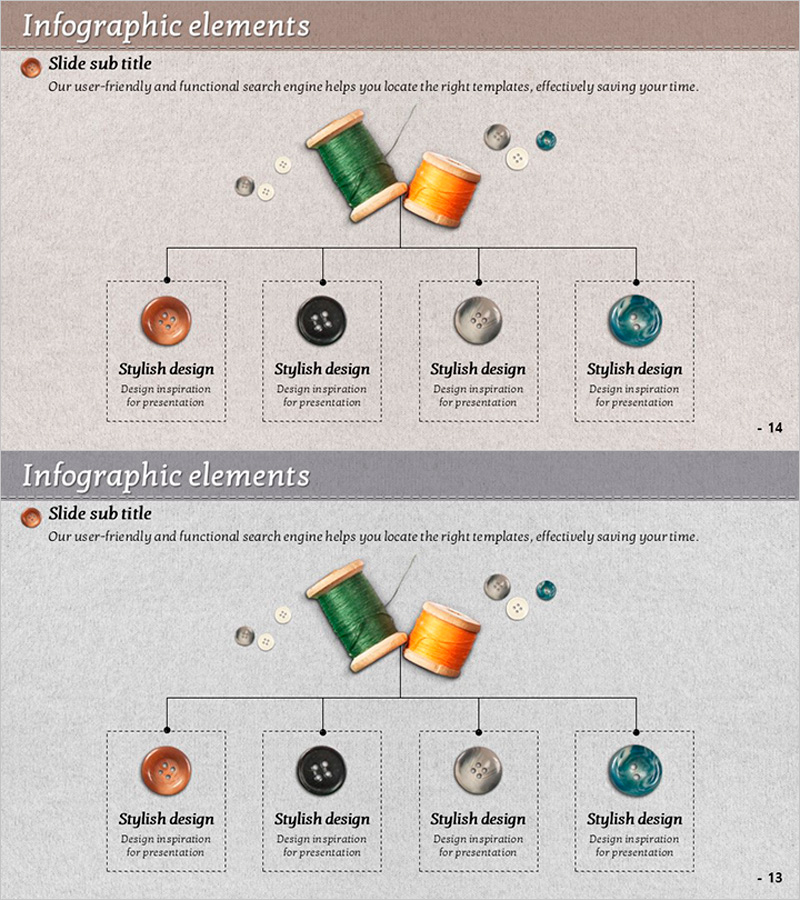
A PowerPoint slide that visualizes organizational structure using button-shaped nodes in an intuitive and professional manner. Four color-coded buttons—brown, black, gray, and teal—allow you to distinguish team members or departments, while a central vertical line clearly connects hierarchical relationships. Ideal for company introductions, team composition presentations, and organizational restructuring announcements. The 2-slide set features different background colors (beige and gray) so you can match your presentation's tone and style.
Usage Points
-
Main Usage
Visualize organizational structure and team composition using button-shaped nodes to clearly communicate team hierarchy and role distribution in team introduction sections. The central vertical line connection intuitively represents superior-subordinate relationships, while four color-coded buttons distinguish team members or departments.
-
How to Use
Use in company introduction presentations, team composition explanations, organizational restructuring announcements, and new employee training. Enter job titles, names, and department information in each button node, and customize colors by team or hierarchy level to create tailored organizational charts.
-
Recommended For
HR professionals, team leaders, executives, organizational restructuring coordinators, new employee training managers, and company profile document creators who need to effectively explain team structures and hierarchies.
-
Slide Structure
2-slide set with each slide featuring a central vertical line branching into 4 button-shaped nodes. Layout includes 1 node at the top and 3 nodes at the bottom, each color-coded in brown, black, gray, and teal. Backgrounds differ: slide 1 features beige, slide 2 features gray.
Related Products
-
Interior Tree Structure Diagram - Product/Service Structure Introduction
#Product/Service Introduction #Diagram #Product/Service Introduction
-
Visualizing Business Structure with Tree Structure Figure Diagram – Refreshing Design
#Product/Service Introduction #Business Introduction #Diagram
-
Promoting Our Signature Tea: Eye-Catching Slide
#Product/Service Introduction #Diagram #Product/Service Introduction
-
Engagement Strategy Through Child Communication – Effective Approach
#Product/Service Introduction #Business Introduction #Diagram
