



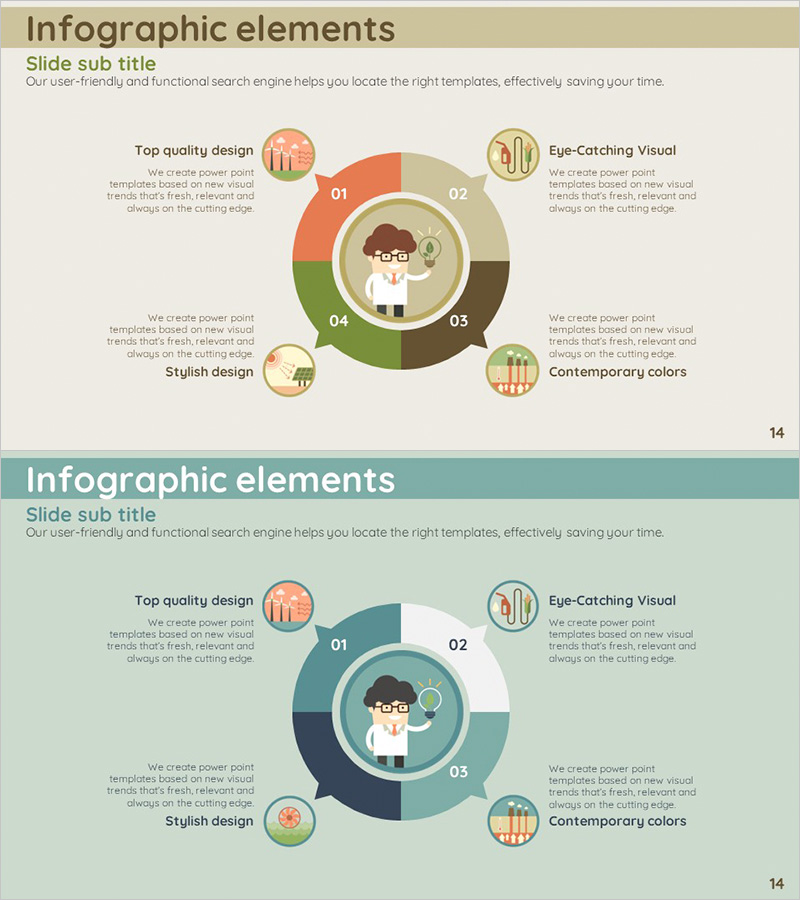
Diagram of Future Expected Effects Through Energy Saving
RJ0600050_13
- Last Update 07/04/2025
- File Size 0.7MB
- # of Slides 2
- File Format PPTX
- Slide Ratio 16:9
- Color
Keywords
- #Content-Based Slides
- #Design-Based Slides
- #Operational Plan
- #Diagram
- #Production and Technology Development Strategy
- #Capital Investment Plan
- #Spread
- #Centralized Diagram
- #16:9
- #radial diagram PowerPoint
- #4-point diagram slide
- #energy saving presentation
- #circular diagram template
- #operational planning slide
- #how to create radial diagram in PowerPoint
About the Product
A radial diagram PowerPoint slide with a central hub and four directional segments radiating outward. Features warm color tones in orange, green, and brown that effectively communicate energy conservation, expected outcomes, and operational improvements. Each segment includes an icon and text area for clear information hierarchy, with a character illustration in the center circle adding visual appeal. Two-slide set provides color variations in beige and teal tones for flexible use across different presentation sections. Fully editable PPTX format enables quick customization for business reports, proposals, and strategic presentations.
Usage Points
-
Main Usage
Illustrates how a central concept branches into four key outcomes or components. Ideal for presenting cause-and-effect relationships, such as energy conservation leading to multiple benefits including cost reduction, environmental impact, operational efficiency, and strategic advantages.
-
How to Use
Enter your core topic in the center circle, then populate each of the four directional segments with related points and descriptions. Customize icons and adjust colors to match your presentation theme. Insert into operational planning, investment strategy, or expected results slides to enhance visual communication.
-
Recommended For
Perfect for energy management, sustainability initiatives, and operational improvement presentations. Suitable for business plans, annual reports, and proposal documents. Recommended for facility managers, environmental coordinators, and strategic planning teams presenting multi-faceted outcomes.
-
Slide Structure
Central circular node with four directional segments (top, right, bottom, left). Each segment contains one icon, title text, and description area. Two-slide set: first slide in warm tones (orange, green, brown), second slide in cool tones (beige, teal, navy).
Related Products
-
Key Features of the Network Platform – Innovative Equipment Investment Plan
#Operational Plan #Diagram #Capital Investment Plan
-
Halloween Concept Introduction Slide – Creative and Distinctive Visuals
#Business Introduction #Operational Plan #Diagram
-
Agricultural Aftercare and Maintenance Strategy Circular Icon
#Operational Plan #Diagram #Production and Technology Development Strategy
-
Strategy for Success through Customized Action Plans
#Operational Plan #Technical Approach #Diagram
