



System Training Illustration PPT Section Slide03
RJ0500035_23
- Last Update 06/16/2025
- File Size 0.4MB
- # of Slides 2
- File Format PPTX
- Slide Ratio 16:9
- Color
Keywords
About the Product
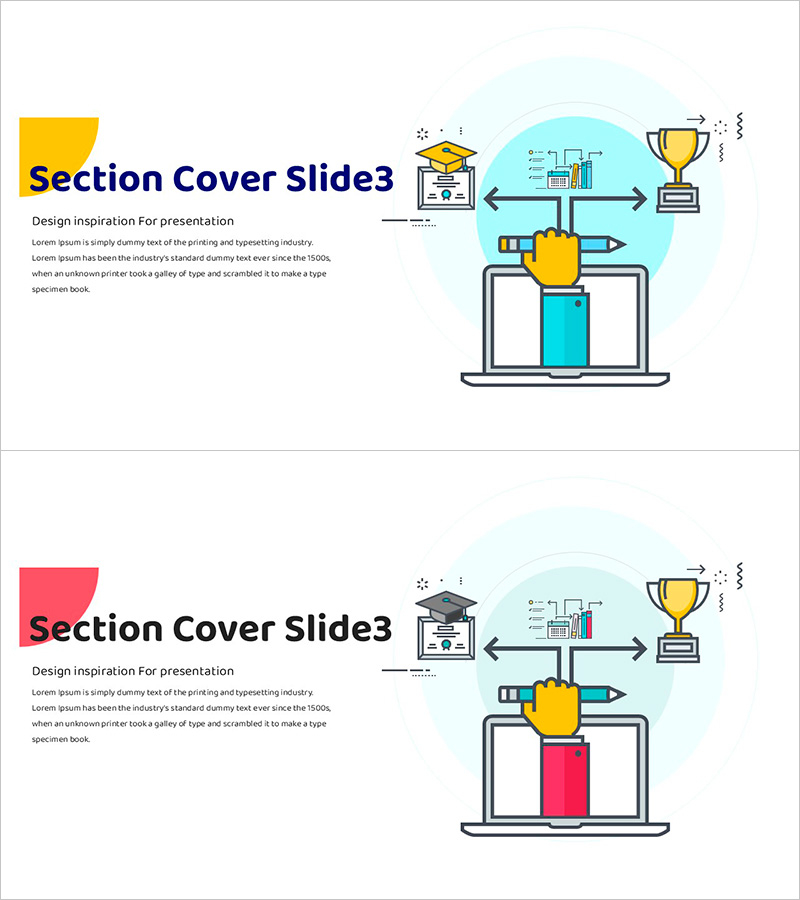
A professional section cover PowerPoint slide set designed for system training and educational program presentations. This 2-slide design features vibrant color combinations—yellow and blue, as well as pink and blue—to visually mark the beginning of each presentation section. Educational icons including graduation cap, laptop, trophy, and pen are integrated with illustrations to convey messages of learning, achievement, and innovation. The left side provides editable text areas for section titles and descriptions, while the right side features fixed illustrations that maintain consistent design throughout your presentation. Ideal for corporate training programs, educational seminars, learning platform introductions, and professional development presentations.
Usage Points
-
Main Usage
Serve as section dividers and visual anchors in educational presentations, training programs, and learning seminars. Each slide marks the transition between training modules and captures audience attention while clearly indicating section changes.
-
How to Use
Edit the left text area to add your section title (e.g., 'System Basics', 'Advanced Features', 'Real-World Applications') and subtitle. Select different color combinations (yellow/blue or pink/blue) for each section to enhance visual distinction and guide learners through the training flow.
-
Recommended For
Training coordinators, instructors, corporate learning teams, online education platform managers, and university lecturers. Perfect for system training, software education, onboarding programs, skills development, and professional certification courses.
-
Slide Structure
Two-slide set with alternating color schemes: left block in yellow or pink with editable title and subtitle areas, right side featuring educational illustration with icons (graduation cap, laptop, trophy, pen) and directional arrows showing learning progression.
Related Products
-
Section Slides on Plate Background – Unique Presentation Style
#Slide Type #Section Cover
-
Mobile Template Section Slide 01 - Intuitive Design
#Slide Type #Section Cover
-
Travel Wide Template – Stylish Section Slide
#Slide Type #Section Cover
-
Social Network Presentation Stylish Slide
#Slide Type #Section Cover
