



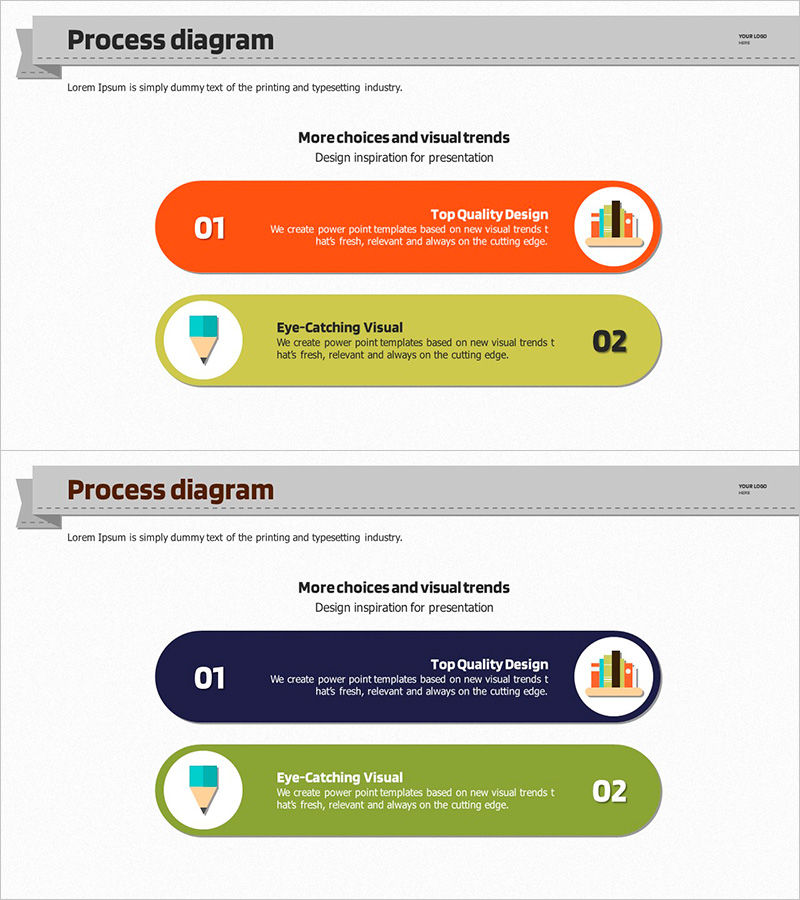
Two Key Message Diagrams – Business Management and Operational Planning
RJ0500007_16
- Last Update 06/09/2025
- File Size 1.2MB
- # of Slides 2
- File Format PPTX
- Slide Ratio 16:9
- Color
Keywords
- #Content-Based Slides
- #Design-Based Slides
- #Business Management
- #Operational Plan
- #Text Box
- #Reporting and Review Plan
- #Mitigation Measures
- #Rounded Rectangle Text Box
- #16:9
- #two key message diagram PowerPoint
- #business management operational planning slide
- #rounded rectangle diagram PPT
- #how to present two key messages in PowerPoint
- #dual message comparison slide
About the Product
A PowerPoint slide that presents two key messages for business management and operational planning using rounded rectangle boxes with distinct visual separation. The design features orange and green color coding to differentiate each message, with dedicated spaces for icons, titles, and descriptions. This 16:9 widescreen 2-slide set is ready for immediate use in presentations. Each rounded box contains structured areas for headline text, supporting description, and icon placement, making it ideal for executive briefings, strategic planning presentations, and operational updates. The dual-message layout enables clear comparison and parallel communication of business priorities.
Usage Points
-
Main Usage
This slide effectively communicates two equally important business messages side-by-side, using rounded rectangle boxes and color differentiation to enhance visual clarity. The design balances both messages and makes them easy to compare during presentations.
-
How to Use
Use this slide when presenting two strategic priorities, alternative approaches, or parallel operational goals. Simply replace the placeholder text in each rounded box with your content, customize the icons if needed, and adjust colors to match your corporate branding.
-
Recommended For
Business managers, operations directors, executives, and project leaders presenting strategic plans, operational updates, or comparative business proposals. Ideal for situations requiring equal emphasis on two distinct business concepts or initiatives.
-
Slide Structure
Two slides total, each containing two rounded rectangle boxes arranged horizontally. Left box (orange) and right box (green) each have dedicated areas for title text, descriptive content, and icon placement, enabling straightforward content customization.
Related Products
-
Issues and Solution Plan Slide Template - An Effective Presentation Tool
#Operational Plan #Diagram #Text Box
-
Single Slide Template for Visualizing Stages of Lung Cancer
#Business Strategy #Diagram #Step-by-Step Schedule Plan
-
Risk Management Presentation Template – Data Analysis and Strategic Approach
#Operational Plan #Diagram #Risk Management
-
Exercise to Build Muscles Slide – Change and Challenge
#Operational Plan #Diagram #Mitigation Measures
