



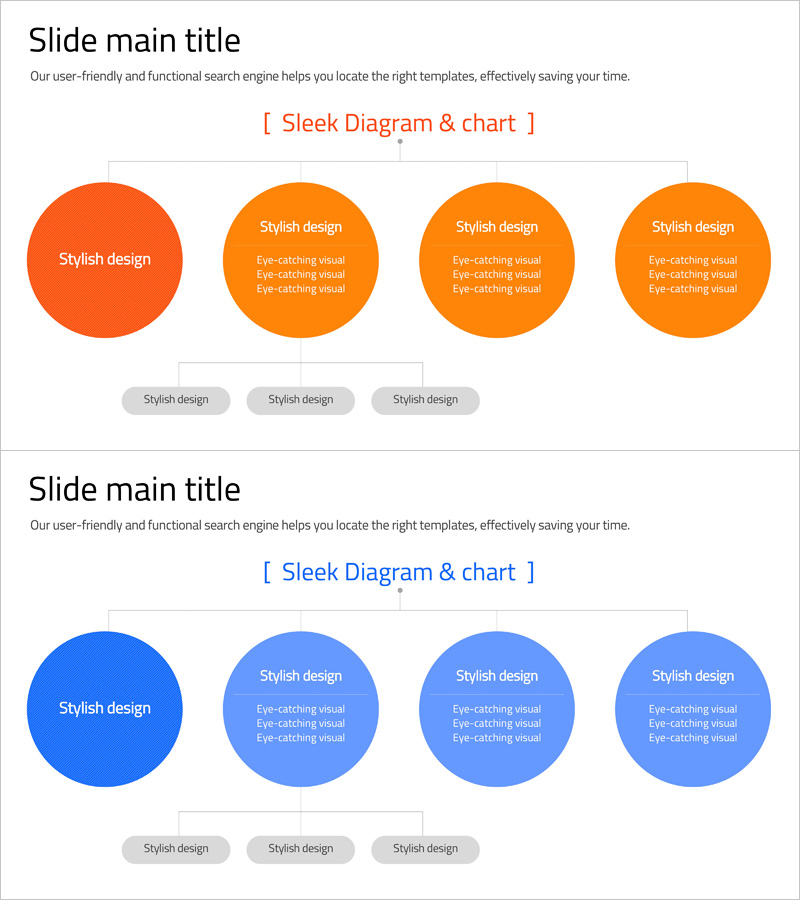
Organizational Chart Circular Diagram – Effective Representation of Company Structure
RJ0400061_4
- Last Update 06/03/2025
- File Size 0.2MB
- # of Slides 2
- File Format PPTX
- Slide Ratio 16:9
- Color
Keywords
- #Content-Based Slides
- #Design-Based Slides
- #Company Introduction
- #Diagram
- #Organizational Chart
- #Structure
- #Tree Diagram
- #16:9
- #organizational chart PowerPoint
- #radial diagram slide
- #company structure template
- #team hierarchy PPT
- #circular organization chart
- #how to create organizational chart in PowerPoint
About the Product
A radial organizational chart PowerPoint slide featuring a central hub connected to four surrounding circular nodes, representing hierarchical structure and team relationships. Includes two color versions: vibrant orange and professional blue. Each circular node accommodates department names, team titles, and descriptive text. The 2-slide set is optimized for 16:9 widescreen format and fully editable in PPTX. Perfect for company introductions, organizational restructuring announcements, and team hierarchy presentations.
Usage Points
-
Main Usage
Visualizes corporate organizational structure with a central department radiating outward to surrounding teams. Clearly communicates reporting lines, departmental relationships, and hierarchical levels for company introductions, organizational announcements, and team structure presentations.
-
How to Use
Enter department names, team titles, and personnel information into each circular node. Use the orange version for creative, dynamic team presentations and the blue version for corporate, formal organizational structures. Adjust node sizes and colors to emphasize department scale or importance.
-
Recommended For
HR and recruitment teams presenting organizational structures, new employee onboarding presentations, executive board meetings, company profile organizational sections, leadership structure communications, and organizational restructuring announcements.
-
Slide Structure
Slide 1 (Orange): 1 large central circular node + 3 medium surrounding nodes with connecting lines. Slide 2 (Blue): identical layout in alternate color scheme. Each node includes 2-3 lines of text input area; background grid lines provide alignment reference.
Related Products
-
Business Tree Structure Organization Chart - Effective Design for Teams
#Company Introduction #Diagram #Organizational Chart
-
Company Silhouette Organization Chart – Intuitive and Elegant Design
#Company Introduction #Diagram #Other
-
Business Organization Chart Folder Diagram – Structural Information Delivery
#Company Introduction #Diagram #Organizational Chart
-
Online Business Relationship Diagram - Effective System Composition
#Company Introduction #Technical Approach #Diagram
