



Service Overview and Goals Green Navy Presentation Template
RJ0400014_4
- Last Update 05/21/2025
- File Size 0.2MB
- # of Slides 2
- File Format PPTX
- Slide Ratio 16:9
- Color
Keywords
- #Content-Based Slides
- #Design-Based Slides
- #Business Introduction
- #Business Vision and Strategy
- #Diagram
- #Business Overview
- #Business Goals
- #Cluster
- #Chain Diagram
- #16:9
- #circular diagram PowerPoint
- #4-step connection diagram
- #service overview PowerPoint slide
- #process flow PPT
- #green navy diagram slide
About the Product
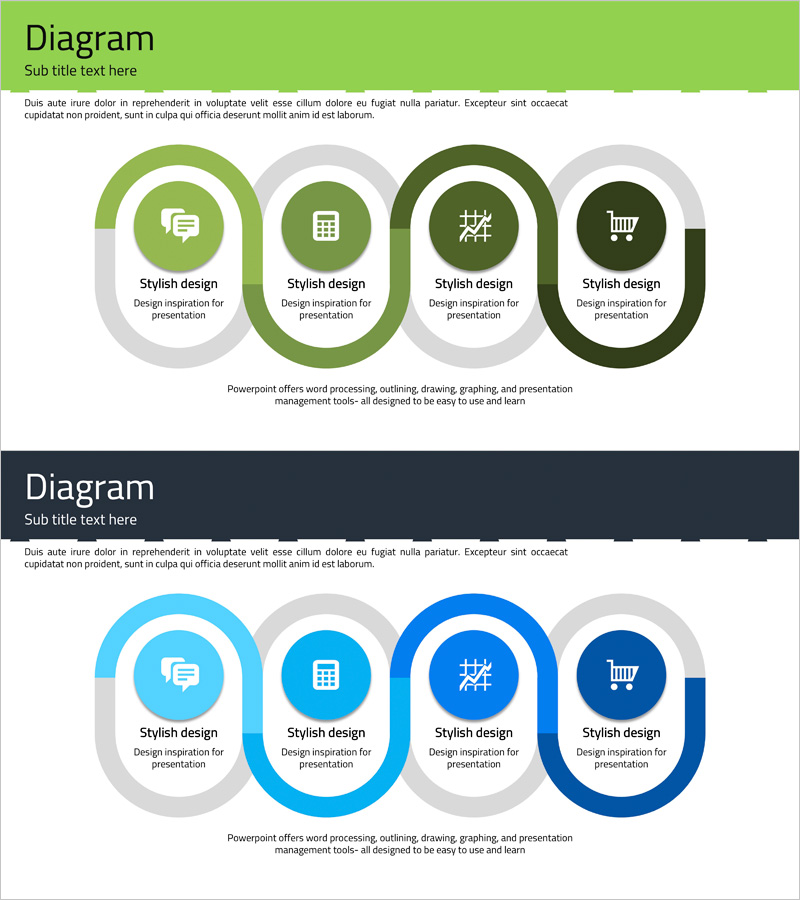
A 4-step circular connection diagram PowerPoint slide designed to present service overview and business goals in a sequential flow. The design uses green and navy color gradients to visually distinguish each step, with central icons and text areas that clearly communicate process progression. This 2-slide set includes both light and dark background variations, allowing you to choose the version that best fits your presentation environment. Ideal for business introductions, service overviews, goal-setting presentations, and strategic planning decks that require clear visual hierarchy and professional appearance.
Usage Points
-
Main Usage
Visualizes service overview, business objectives, process flows, and phased implementation strategies using a 4-step circular structure. Each step features an icon and text area to enhance information delivery, while the green-to-navy color progression intuitively represents stage advancement and hierarchy.
-
How to Use
Enter service stage names, objectives, and descriptions in the text areas of each step. Icons can be customized to match each stage's characteristics, and colors are fully editable to align with your corporate branding. Select between the light or dark background version based on your presentation environment and display setup.
-
Recommended For
Recommended for business introductions, service overview presentations, goal-setting meetings, strategic planning decks, employee onboarding materials, and client proposals. Ideal for marketing teams, planning departments, sales teams, and executive briefings.
-
Slide Structure
Four circular nodes arranged in a continuous cycle with connecting lines showing progression. Each node contains an icon area and text input field. Color gradient transitions from green through navy tones to indicate step advancement. Two background versions provided: light background and dark background for flexible presentation contexts.
Related Products
-
Transportation Business Overview – Infographic Slide for Vision and Strategy
#Business Introduction #Business Vision and Strategy #Diagram
-
Business Overview and Goals – Blue, Orange, Green Cluster Design
#Business Introduction #Business Vision and Strategy #Diagram
-
Business and Service Overview Semicircle Diagram
#Product/Service Introduction #Business Introduction #Business Vision and Strategy
-
Concise Business Objectives Slide – Vision and Strategy
#Business Introduction #Business Vision and Strategy #Text Box
