File Folder Template Cover – A Professional Start
RJ0300046
- Last Update 04/30/2025
- File Size 4.3MB
- # of Slides 2
- File Format PPTX
- Slide Ratio 16:9
- Color
Keywords
About the Product
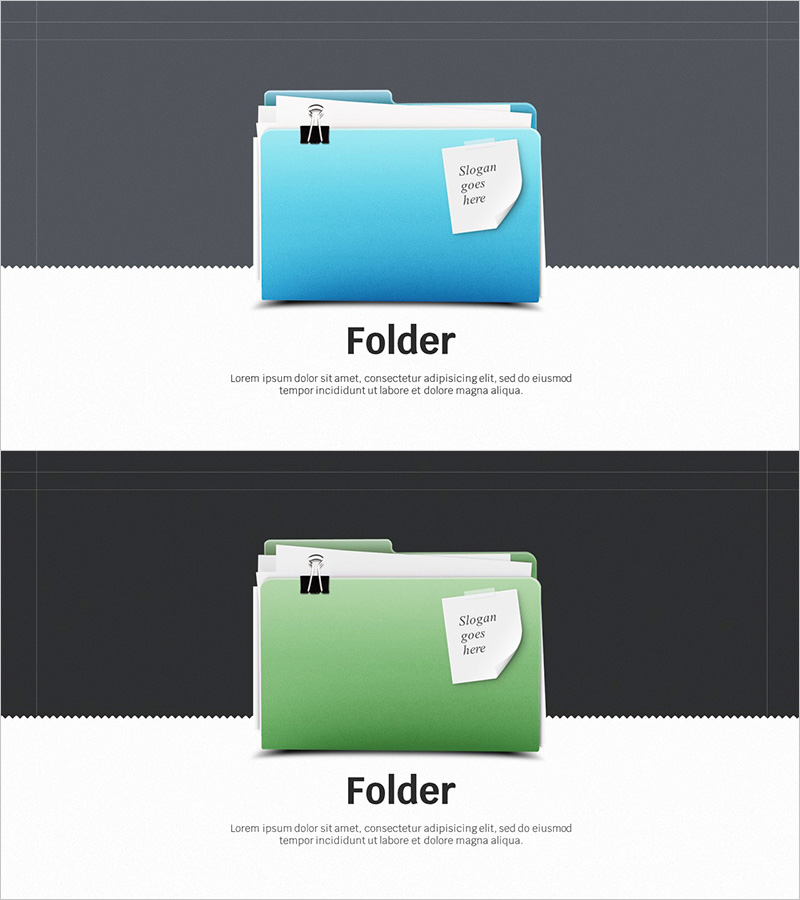
A cover slide featuring file folder imagery designed for document organization and file management themes. The slide showcases bright blue and green folder graphics with a dedicated slogan input area. Provided as a 16:9 ratio, 2-slide PowerPoint presentation, this template works perfectly as an opening page for corporate documents, reports, and proposals. Each slide features distinct color tones, allowing flexible use for section dividers or topic-specific cover pages. The text is fully editable and ready to download for immediate integration into your presentations.
Usage Points
-
Main Usage
This cover slide visually represents document organization, file management, and resource storage themes. Use it as the opening page for corporate documents, reports, and proposals to clearly communicate your document's subject. The two color-differentiated slides enable flexible use as section dividers or supplementary material covers.
-
How to Use
Edit the 'slogan goes here' text area to add your document title, subtitle, date, or key information. Use the blue-toned slide for primary sections and the green-toned slide for secondary sections or supplementary materials. Enhance branding by inserting your company logo or additional text elements as needed.
-
Recommended For
Ideal for corporate reports, business proposals, project planning documents, company introductions, internal announcements, and any business presentation requiring a professional cover page. Particularly effective for presentations on document management, resource organization, and file system topics.
-
Slide Structure
Composed of 2 slides with a simple, folder-centric layout. Each slide features a folder icon and clip image at the top, a large folder graphic in the center, and a slogan input area in the upper right. Color differentiation between blue and green tones provides visual variety and organizational clarity.