



Team Collaboration and Meeting Strategy PowerPoint Template
RJ0300044_24
- Last Update 04/30/2025
- File Size 1.4MB
- # of Slides 2
- File Format PPTX
- Slide Ratio 16:9
- Color
Keywords
- #Content-Based Slides
- #Product/Service Introduction
- #Business Introduction
- #Business Vision and Strategy
- #Composition
- #Business Overview
- #16:9
- #business meeting PowerPoint slide
- #team collaboration presentation design
- #meeting strategy slide
- #corporate team PPT
- #how to present business overview in PowerPoint
About the Product
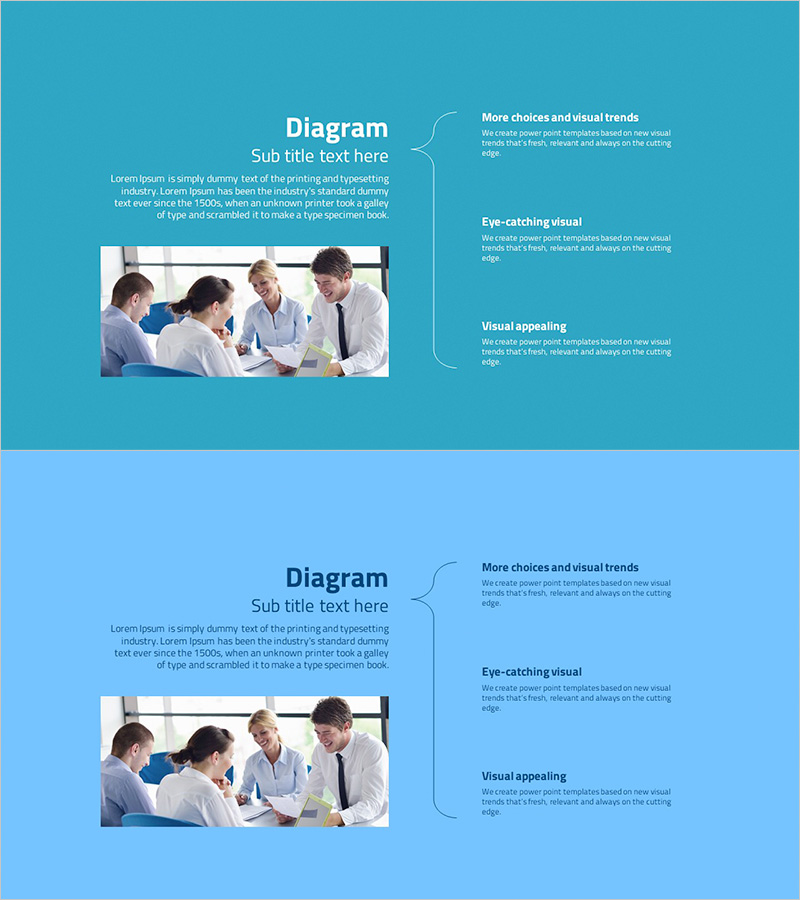
A 2-slide PowerPoint presentation template designed to visualize team collaboration and meeting strategy. The layout features a turquoise and light blue two-tone background with a symmetrical left-right arrangement of image area and text boxes. A team meeting photo is paired with three key messages highlighted by curved connector lines. This PPT slide design is ready to use for business overview presentations, team introductions, and collaboration process explanations. Provided in 16:9 widescreen PPTX format with fully editable text and image areas.
Usage Points
-
Main Usage
This slide effectively communicates team collaboration culture and meeting strategy. Use it in company presentations to visually explain organizational collaboration methods and decision-making processes, or in team-building workshops to emphasize the importance of collaborative teamwork.
-
How to Use
Insert a team photo or meeting scene in the left image area, then add three core collaboration values in the right text boxes. The curved connector lines represent the interconnection between items, so customize the text to match your presentation context. Background colors can be adjusted to align with your corporate brand identity.
-
Recommended For
Ideal for HR professionals, executives, and team leaders explaining organizational culture and collaboration systems. Effective for new employee orientation, investor presentations, partner meetings, and internal strategy sessions where you want to highlight team collaboration capabilities.
-
Slide Structure
Two-slide format with each slide divided into a left image area (rectangular frame) and right text area (title plus three key message items). The right text section is connected by curved lines that visually represent information hierarchy and relationships.
Related Products
-
Cell Phone Service Overview Slide – Clear and Concise Information Delivery
#Product/Service Introduction #Business Introduction #Business Vision and Strategy
-
Business Structure Diagram – Clear Strategy and Composition
#Product/Service Introduction #Business Introduction #Business Vision and Strategy
-

Business Growth Key Factors Diagram
#Product/Service Introduction #Business Vision and Strategy #Diagram
-
General Provisions of the Proposal Slide – The Foundation of Business
#Company Introduction #Business Introduction #Business Vision and Strategy
